If you'd like to buy a big amount of copies, please contact [email protected]
Microsoft Windows 10 Home OEM (Lifetime License / Global)

Microsoft Windows 10 Home OEM (Lifetime License / Global)

Rating

Price
  • $3.53
cards klarna GPay Apple Pay affirm afterpay

Official License: Global | 24/7 U.S. Support | Gamers Outlet - CD Keys

Platform
Microsoft Lifetime License
Points Gained
2
Availability
In Stock
Support
24/7 Support
Delivery
Free digital delivery
Your Region
Supported
Available Options for Windows 10 options

$3.53

Instant Activation: Microsoft Windows 10 Home OEM (Lifetime License / Global) CD Key

Despite the fact that there is a newer version available, Windows 10 is still widely used on hundreds of millions of computers all over the world. Its unique style, visual design and excellent attention to detail makes it a must-see product. And the best part is that it gives you access to an outstanding operating system at an affordable price.

What makes Windows 10 Home different?

One of the upsides of getting a Windows 10 Home CD Key OEM is that you can access some of the best Windows features we’ve had in quite some time. These include:

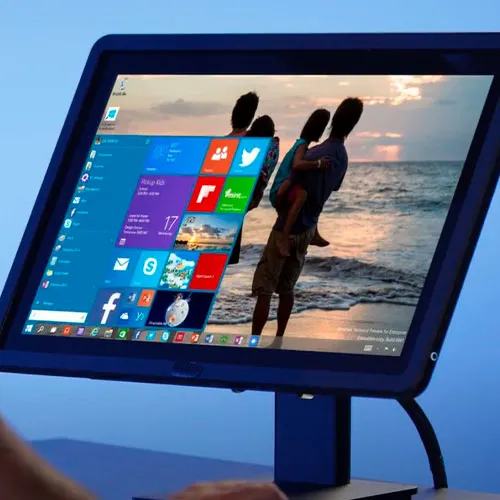
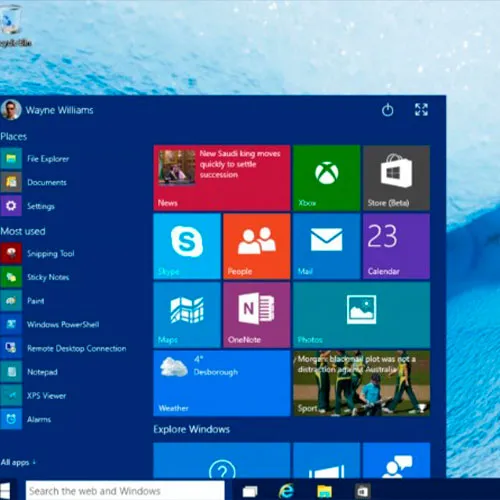
·         We have the return of the Start menu, which was gone in the previous version.

·         Windows 10 Home also adds Cortana as the virtual assistant.

·         Users can access features such as Task View, virtual desktops, Windows Hello biometric authentication.

·         There’s also the Action Center, Direct X 12 support, along with the new Microsoft Edge browser.

Windows 10 Home highlights for gamers

As a gamer, you will find that our Windows 10 Home CD Key OEM gives you access to a stable operating system with very good performance and a lot of updates spanning over multiple years.  

Additionally, this version of Windows offers complete support for Direct X 12, as well as Auto HDR. Your games will offer great eye protection thanks to the HDR feature. All in all, as a gamer you will receive high quality visuals and smooth performance.

One thing to consider about Windows 10 however is that it received security updates until October 2025. That means it’s not getting any new security updates, but it can be used alongside updated security software to protect you from hacks.

Why should you use the Windows 10 Home version?

The Windows 10 Home version is less demanding hardware-wise, since it has lower requirements when compared to something like Windows 11, for example. You still have a responsive, modern look and great operating system.

System requirements for Windows 10 Home include:

·         A 1 GHz processor

·         1 GB of memory for the 32-bit version, 2 GB for the 64-bit version

·         16 GB of storage for the 32-bit version, 32 GB for the 64-bit version

·         Direct X 9 with a WDDM 1.0 driver

You still have great defense against hackers and attackers, while enjoying stunning visuals and excellent support.

It’s a good idea to buy Windows 10 Home key if:

·         You have an older PC which doesn’t support/barely supports Windows 11

·         You are a budget user who wants a cheap Windows 10 key

·         You’re a gamer that wants stable performance, especially from older games

·         If you’re looking for a familiar interface

What does OEM mean for Windows 10 Home?

If you buy the Windows 10 Home CD Key OEM from us, OEM stands for Original Equipment Manufacturer. These keys were originally sold as a part of a larger set, including some equipment, directly to a large company who bought them in bulk.

When you get a cheap Windows 10 key, consider the following:

·         OEM keys are locked to your device, and they can only be activated once on a motherboard. Even if you keep the PC you have, but you change its motherboard during an upgrade, you will need a new OEM key.

·         The OEM license can’t be used to downgrade or to upgrade your system. That means in order to use the Windows 10 Home CD Key OEM, you will need an installed version of the operating system.
Please note that we can provide a guide on how to upgrade from Home to Pro prior to activation. For assistance, kindly contact our support team at [email protected] .

What will you receive with your purchase?

Every time you buy Windows 10 Home key from us, you will receive the following:

·         A 25-character Windows 10 activation key

·         Official download link for the latest Windows 10 version

·         Activation instructions for online and phone activation

·         Step-by-step installation guide

If you’re going to buy the Windows 10 Home OEM key global, you will be able to install it quickly, while also receiving support from our team in case there are any issues. Keep in mind that installing Windows 10 on your computer requires the use of USB installation media, and you should always do a clean install, due to the OEM limitations.

Grab your Windows 10 Home CD Key OEM today!

If you want to install and use Windows 10 Home, then it’s a very good idea to grab a genuine key today. Gamers Outlet offers you direct access to a vast array of different keys for games, Windows and many others, all you have to do is browse our offer today.

With our cheap Windows 10 key, you can finally use Windows 10 Home at your own pace, without any restrictions. All you need is to avail the opportunity and try it out today. You also get an exceptional warranty and direct support, so don’t hesitate and get your Windows 10 activation key at an amazing price!

  • Will I get an invoice?
    Invoice will automatically generate upon placing an order.

  • Where can I find my invoice?
    Once the order is completed, the invoice will be available under 'My Account' (top right corner of the top bar) -> 'Order History.'

  • Can I edit my invoice?
    Currently, you cannot do this yourself. Please contact our support via email at [email protected], and we will be glad to assist you with the matter. For a faster process, please include the order number and any relevant information you want to be shown (such as your name, ID/tax number, etc.).

  • Can I install this on macOS?
    No, this product does not support MacOS.

  • Can I redeem this product anywhere?
    Yes, this Product is a Global version.

  • Can I transfer this product to new hardware?
    Yes, this key can be used again if the OS or software is reinstalled or formatted.
    For instructions, please contact our support at [email protected]

  • Is there a specific way I need to install this product?
    The key will work on an inactive Windows 10 Home system or a clean installation of Windows 10 Home.
    For more information, please read the 'Activation' tab.

  • What if I need a COA sticker for that product?
    The COA label print can be scanned and sent to you upon request, for an additional charge.

Download link: https://www.microsoft.com/en-us/software-download/windows10

In order to install the software on your PC, please follow the instructions here.

In case of an issue with activating your Windows key, please use one of the methods:


Method 1:

After Windows installation

1. Go to "Settings''

2. Select "Update & Security"

3. Find "Activation"

4. Select "Activate" or "Change Product Key"

5. Enter your windows product key


Method 2:

1. Click on ”Start” icon , then open ”Settings”, choose ”Update & security”, and then select ”Activation”.

2. Choose the ”Activate by phone” option.

3. Click the drop-down menu, select your country, and then click ”Next”.

4. Call the Toll free number and follow instructions to generate confirmation ID to activate your Windows.


Method 3:

1. Press and hold "Windows" key and press "R" on your keyboard.

2. Type "SLUI 4" in the window that pops up and press enter.

3. Click the drop-down menu, select your country and then click Next.

4. Call the Toll free number and follow instructions to generate confirmation ID to activate your Windows.

More information regarding phone activation can be found here.

Varot Parthompark 26/08/2026

this is my second key. the first one is windows 11. it works perfectly.

Bigkid 23/08/2026

I got the key right away. It worked. I had to find it under certain button on the order website. I just copied and pasted it. There was a fee added at the end. I paid 3.02 Pounds Sterling. It is still very cheap.

Bigkid 23/08/2026

I got the key right away. It worked. I had to find it under certain button on the order website. I just copied and pasted it. There was a fee added at the end. I paid £3.02. It is still very cheap.

Bigkid 23/08/2026

I got the key and it worked to activate windows 10 home. I found it on the order website itself I copied and pasted it. I paid £3.02 as a fee was included at the end. It is still a very cheap and reasonable price.

Bigkid 23/08/2026

I found the activation under a certain button in the order website itself. It just copied and paste it. It worked straight away. I paid £3.02 as a certain fee was included at the end. It is still a very sensible and cheap price.

Write a review

Note: HTML is not translated!

Captcha
Review Score: 5 / 5
Varot Parthompark 26/08/2026

this is my second key. the first one is windows 11. it works perfectly.

Bigkid 23/08/2026

I got the key right away. It worked. I had to find it under certain button on the order website. I just copied and pasted it. There was a fee added at the end. I paid 3.02 Pounds Sterling. It is still very cheap.

Bigkid 23/08/2026

I got the key right away. It worked. I had to find it under certain button on the order website. I just copied and pasted it. There was a fee added at the end. I paid £3.02. It is still very cheap.

Bigkid 23/08/2026

I got the key and it worked to activate windows 10 home. I found it on the order website itself I copied and pasted it. I paid £3.02 as a fee was included at the end. It is still a very cheap and reasonable price.

Bigkid 23/08/2026

I found the activation under a certain button in the order website itself. It just copied and paste it. It worked straight away. I paid £3.02 as a certain fee was included at the end. It is still a very sensible and cheap price.

Support