Mac için Office 2019, macOS Big Sur ve sonraki sürümleriyle uyumludur.
Sadece MAC işletim sisteminde çalışır. Japonya ve Brezilya'da etkinleştirilemez.
Eski macOS sürümlerinde çalışmaz.
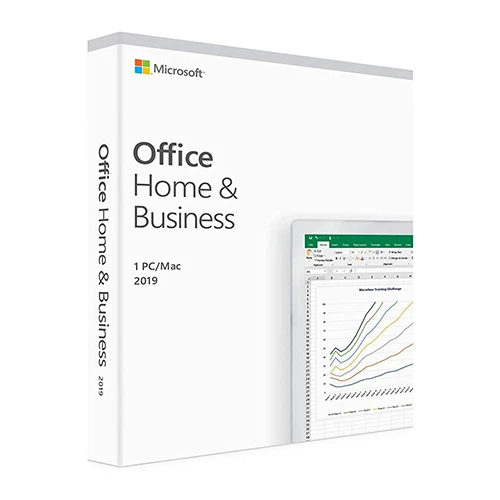
Microsoft Office 2019 Ev ve İşletme (Mac / Hesaba Bağlı Lisans) (Ömür Boyu Lisans / Global)

Microsoft Office 2019 Ev ve İşletme (Mac / Hesaba Bağlı Lisans) (Ömür Boyu Lisans / Global)

Puanınız

İncelemeler
Fiyat
  • $16.66
cards klarna GPay Apple Pay affirm afterpay

Resmi Lisans: Küresel | 7/24 ABD Destek | Gamers Outlet - CD Anahtarı

Platformu
Microsoft Lifetime License
Kazanılan Puanlar
14
Uygunluk
Stokta Yok
Destek
24/7 Destek
Teslimat
Ücretsiz dijital teslimat
Bölgeniz
Destekleniyor
Mevcut seçenekler Office 2019 options

$16.66

Anında Etkinleştirme: Microsoft Office 2019 Home and Business (Mac / Hesaba Bağlı Lisans) (Ömür Boyu Lisans / Küresel) CD Anahtarı

Daha fazlasını başarın, Office 2019, zaman kazandıran özellikler, yeni ve modern bir görünüm ve yerleşik işbirliği araçlarıyla daha hızlı içerik oluşturmanıza ve düzenlemenize yardımcı olmak üzere tasarlanmıştır. Ayrıca, belgelerinizi OneDrive’da bulutta kaydedebilir ve her yerden erişebilirsiniz. 

Minimum Sistem Gereksinimleri: Office 2019 Home ve Business sürümleri 64 bit olarak mevcuttur. macOS Monterey 12 ve daha yeni sürümlerle uyumludur. 

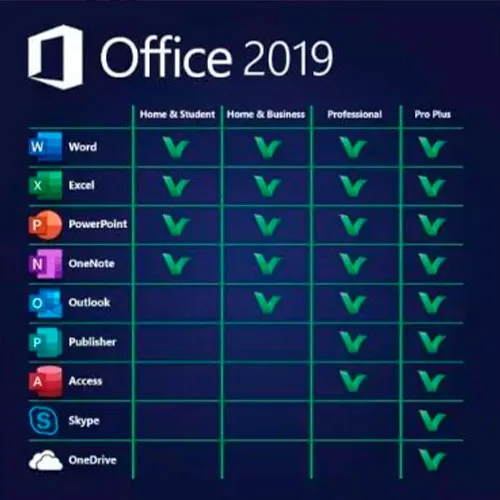
İçindekiler: Word 2019, Excel 2019, PowerPoint 2019 ve OneNote 2019, Outlook 2019

AKTİVASYON TALİMATLARI

1 – Resmi etkinleştirme web sitesine gidin: https://setup.office.com/redeem/enter-key

2 – Kodu kullanın.

Ayrıca Windows 11 CD Anahtarını BURADAN sunuyoruz
Windows 10 CD Anahtarı BURADA
Office 2021 CD Anahtarını BURADAN

  • Fatura alacak mıyım?
    Sipariş verildiğinde fatura otomatik olarak oluşturulacaktır.

  • Faturamı nerede bulabilirim?
    Sipariş tamamlandıktan sonra, fatura 'Hesabım' (üst çubuğun sağ üst köşesi) -> 'Sipariş Geçmişi' bölümünde görüntülenecektir.

  • Faturamı düzenleyebilir miyim?
    Şu anda bunu kendiniz yapamazsınız. Lütfen [email protected] adresinden destek ekibimizle iletişime geçin, size yardımcı olmaktan memnuniyet duyarız. İşlemin daha hızlı gerçekleşmesi için lütfen sipariş numarasını ve gösterilmesini istediğiniz ilgili bilgileri (adınız, kimlik/vergi numaranız vb.) ekleyin.

  • Bunu macOS'a yükleyebilir miyim?
    Evet, bu ürün MacOS'u desteklemektedir ( Monterey veya daha üst bir sürüm gereklidir).

  • Bu ürünü herhangi bir yerde kullanabilir miyim?
    Evet, bu ürün küresel bir versiyondur.

  • Bu ürünü yeni bir donanıma aktarabilir miyim?
    Evet, bu anahtar Microsoft hesabınıza bağlanabilir.

  • Bu ürünü kurmak için belirli bir yöntem izlemem gerekiyor mu?
    Lütfen 'Etkinleştirme' sekmesini okuyun.

  • Ürün için orijinallik sertifikası (COA) etiketi gerekiyorsa ne yapmalıyım?
    Ek bir ücret karşılığında, talep üzerine COA etiketinin çıktısı taranarak size gönderilebilir.

ACTIVATION INSTRUCTIONS

1 – Navigate to the official activation website https://setup.office.com/redeem/enter-key

2 – Redeem the code.

Notice:

At the end of the installation, a window may appear stating that an Office upgrade is required.
Please note that selecting this option will upgrade your installation to Office 365/2024, which will prevent you from fully activating Office 2016/2019.
If you attempt to log in after this upgrade,  Office will not be able to locate a valid license for your current installation.
This is due to recent updates, which require an Office 2021/2024 license or an active Office 365 subscription (version 16.90 and later).

To avoid this, skip any Office updates offered during the installation process.
Also, uncheck the option to "Automatically keep Microsoft apps up to date."
After that, simply click the red "X" at the top left of the window, log in with your Microsoft account, and complete the activation process.


bénédicte 26/05/2026

bonjour est ce que ça fonctionne pour IOS Ventura 13? merci +++

Juby Zacharias 24/05/2026

The quick support help me to solve an issue with the MacOS version on my Mac.
I am very satisfied with the this product. Very easy process to buy, activate and install. It all worked just fine.

Gus Vargas 20/09/2024

I am very satisfied with the purchase of this product. Very easy process to buy, activate and install. It all worked just fine. Gamers outlet is my number one choice. very reliable. Thanks a million.

Roberto 15/07/2024

All ok. The quick support help me to solve an issue with the MacOS version on my Mac, too old.

Utkarsh 20/03/2024

The redemption process was super easy, it takes you to the MyDrive website for redemption. I could download and install and get working within 5 minutes. So good experience.

Yorum yap

Not: HTML kullanmayın!
Captcha
Review Score: 5 / 5
bénédicte 26/05/2026

bonjour est ce que ça fonctionne pour IOS Ventura 13? merci +++

Juby Zacharias 24/05/2026

The quick support help me to solve an issue with the MacOS version on my Mac.
I am very satisfied with the this product. Very easy process to buy, activate and install. It all worked just fine.

Gus Vargas 20/09/2024

I am very satisfied with the purchase of this product. Very easy process to buy, activate and install. It all worked just fine. Gamers outlet is my number one choice. very reliable. Thanks a million.

Roberto 15/07/2024

All ok. The quick support help me to solve an issue with the MacOS version on my Mac, too old.

Utkarsh 20/03/2024

The redemption process was super easy, it takes you to the MyDrive website for redemption. I could download and install and get working within 5 minutes. So good experience.

Support