





Metal Wolf Chaos XD (PC Steam Key / Global)

Metal Wolf Chaos XD (PC Steam Key / Global)

Rating

Reviews
Price
  • $9.84
cards klarna GPay Apple Pay affirm afterpay

Official License: Global | 24/7 U.S. Support | Gamers Outlet - CD Keys

Platform
Steam PC Steam Key
Points Gained
8
Availability
Out Of Stock
Support
24/7 Support
Delivery
Free digital delivery
Your Region
Supported


$9.84

Metal Wolf Chaos XD Cd Key Steam Global

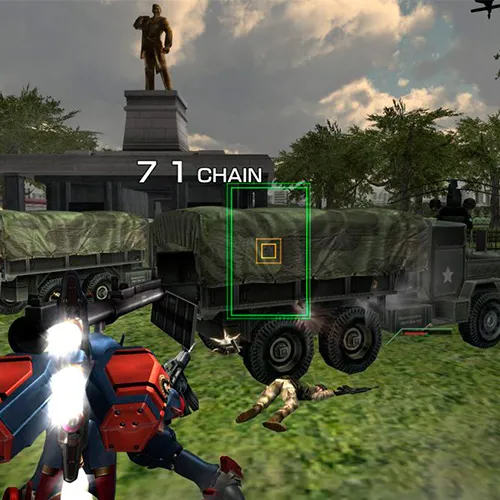
Metal Wolf Chaos XD is a fast-paced, action-packed video game that was originally released in 2004 for the Xbox. The game is set in a fictional version of the United States, where the Vice President has staged a coup and taken control of the country. The player takes on the role of the President of the United States, who must fight back against the Vice President's army and reclaim the country. The game is known for its over-the-top action, with the player controlling a giant mech suit that can shoot missiles, guns, and other weapons.

The game received a cult following due to its unique premise and gameplay. The game's humor and satire of American politics and culture also garnered attention. The re-release of the game in 2019 as Metal Wolf Chaos XD brought updated graphics and gameplay mechanics, making it accessible to a new generation of gamers. The game also includes new voice acting and cutscenes, adding to the overall experience.

Overall, Metal Wolf Chaos XD is a fun and entertaining game that provides a unique take on American politics and culture. The game's fast-paced action and humor keep players engaged throughout the gameplay experience. The updated graphics and gameplay mechanics make it worth revisiting for fans of the original game, while also appealing to new players. If you're a fan of action games and looking for something different, Metal Wolf Chaos XD is definitely worth checking out.

Please follow the steps below to redeem your Steam key:

1) Download and install the Steam client on your PC: https://store.steampowered.com/about/
2) Open the Steam client, log in or create an account if you don't have one, and locate the Games tab on the top menu. Click this and then select "Activate a Product on Steam…"


3) Enter your code into the product activation field


Your game is now viewable in the "Library" tab and is available to download/install when you're ready.
Happy Gaming!

Jeff 13/03/2022

This website is a reliable and trustworthy online shopping destination. The product variety is impressive, and the customer service team is always there to assist if needed.

Write a review

Note: HTML is not translated!
Captcha
Review Score: 5 / 5
Jeff 13/03/2022

This website is a reliable and trustworthy online shopping destination. The product variety is impressive, and the customer service team is always there to assist if needed.

Support