invoice will automatically generate upon placing an
order
Available Languages: MULTILANGUAGE
ACTIVATION INSTRUCTIONS:
1)
Download and install Using the official Project 2019 professional Download:
https://officecdn.microsoft.com/db/492350f6-3a01-4f97-b9c0-c7c6ddf67d60/media/en-us/ProjectPro2019Retail.img
The
code is valid for 1 pc / 1 installation - if you uninstall/reinstall you might
need to buy a new code.
Use the Getting Starting
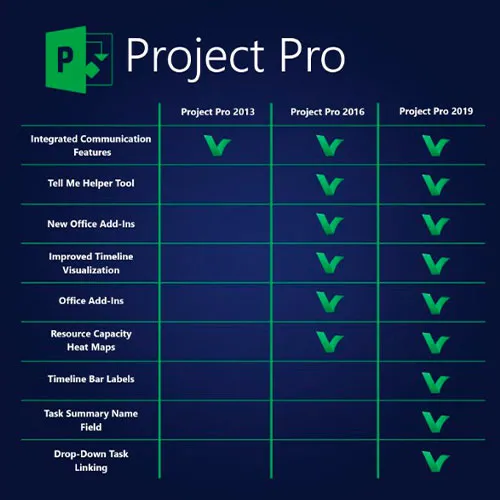
screen to quickly learn about new features in Project.
Pre-built templates help you
get your project started on the right track.
Schedule efficiently Familiar
automated scheduling tools help you reduce inefficiencies and training time.
Multiple timelines make it
easier to visualize complex schedules. Optimize tasks Visualization tools help
you understand how tasks relate to one another. And by running what-if
scenarios, you can make the most of your task assignments. Key Features Fast
startup The Getting Started screen walks you through basic capabilities, like
linking tasks and creating a timeline, to help you get up to speed fast.
Best-in-class templates Start your project on the right track using one of the
many pre-built templates available in Project Standard and on Office.com.
Intuitive search Use the Tell Me search bar to find useful features in Project
so you can work more efficiently. Powerful scheduling Familiar charts Project
Standard offers familiar tools to help you create schedules with ease and
reduce training time. Smart automation Reduce inefficiencies with automated
features.
We Also Offer Windows 11 cd keys HERE
Windows 10 cd keys HERE
Office 2021 cd keys HERE

- Will I get an invoice?
Invoice will automatically generate upon placing an order.
- Where can I find my invoice?
Once the order is completed, the invoice will be available under 'My Account' (top right corner of the top bar) -> 'Order History.'
- Can I edit my invoice?
Currently, you cannot do this yourself. Please contact our support via email at [email protected], and we will be glad to assist you with the matter. For a faster process, please include the order number and any relevant information you want to be shown (such as your name, ID/tax number, etc.).
- Can I install this on macOS?
No, this product does not support MacOS.
- Can I redeem this product anywhere?
Yes, this Product is a Global version.
- Can I transfer this product to new hardware?
No, The code is valid for 1 pc or 1 installation - if you uninstall or reinstall you might need to buy a new code.
- Is there a specific way I need to install this product?
Please read the 'Activation' tab.
- What if I need a COA sticker for that product?
The COA label print can be scanned and sent to you upon request, for an additional charge.