Project Professional 2024
Pre-built templates help you get your project started on the right track
Sync with Project Online and Project Server
Submit timesheets to capture time spent on project and non-project work
Run what-if scenarios to make the most of your task assignments
Auto-populate start and end dates based on dependencies
Visually represent complex schedules with built-in multiple timelines
Licensed for 1 PC
Supports Long-Term Servicing Channel (LTSC) and is compatible with Office LTSC and Office 2024
Core Features:
Task Scheduling
Create, manage, and assign tasks with ease Set priorities and deadlines to keep projects on track
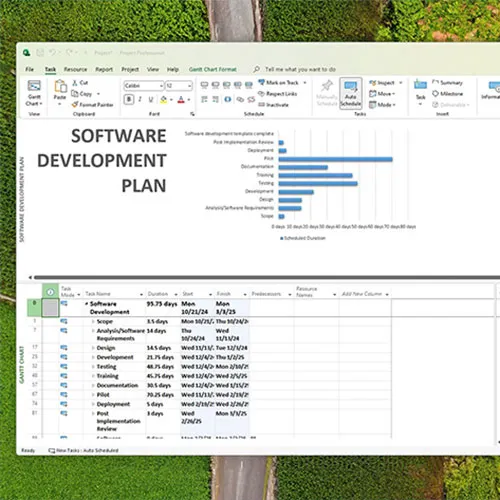
Gantt Charts
Visualize project timelines and progress Identify bottlenecks and optimize workflows
Built-in Reporting Tools
Access real-time insights with customizable reports Monitor project performance and resource allocation
Resource Management
Manage resources effectively to avoid over-allocation Track resource usage and adjust allocations as needed
Cost Tracking
Monitor project budgets and control costs Generate financial reports for budget analysis
User-Friendly Interface
Navigate easily with an intuitive interface Quickly access tools and features with a minimal learning curve
Integration Capabilities
Integrate with other Microsoft products for enhanced functionality Collaborate efficiently with team members using shared resources

- Will I get an invoice?
Invoice will automatically generate upon placing an order.
- Where can I find my invoice?
Once the order is completed, the invoice will be available under 'My Account' (top right corner of the top bar) -> 'Order History.'
- Can I edit my invoice?
Currently, you cannot do this yourself. Please contact our support via email at [email protected], and we will be glad to assist you with the matter. For a faster process, please include the order number and any relevant information you want to be shown (such as your name, ID/tax number, etc.).
- Can I install this on macOS?
No, this product does not support MacOS.
- Can I redeem this product from anywhere?
Yes, this product is a global version.
- Can I transfer this product to new hardware?
Yes, this key is bind to your Microsoft account.
- Is there a specific way I need to install this product?
Please read the 'Activation' tab.
- What if I need a COA sticker for that product?
The COA label print can be scanned and sent to you upon request, for an additional charge.
Please redeem your code here: setup.office.com It will let you download the installer
You can reinstall Project from your Microsoft account on the same PC whenever needed.