Instant Activation: Microsoft Visual Studio 2019 Professional (Lifetime License / Global) CD Key
Microsoft Visual Studio 2019 Professional is a comprehensive
software development platform that offers a wide range of tools and features
for developers. With Visual Studio 2019 Professional, you can create and debug
applications for Windows, Linux, macOS, Android, and iOS, as well as web and
cloud applications.
Some key features of Visual Studio 2019 Professional
include:
IntelliSense:
This feature provides intelligent code completion, parameter info, and
quick info for C#, Visual Basic, and C++, as well as Python and
TypeScript.
Debugging
and diagnostics: Visual Studio 2019 Professional includes advanced
debugging and diagnostic tools to help you identify and fix issues in your
code.
Code
navigation: The code navigation tools in Visual Studio 2019 Professional
allow you to easily navigate through your code, find definitions, and go
to references.
Code
refactoring: Visual Studio 2019 Professional includes a range of code
refactoring tools to help you improve the quality and maintainability of
your code.
To learn more about Visual Studio 2019 Professional and
purchase a license, visit our website at https://www.gamers-outlet.net.
We also offer a wide range of other software products, including operating
systems, productivity tools, and security software. Our team would be happy to
assist you with any questions you may have about our products and services.
ACTIVATION INSTRUCTIONS:
Download and redeem on the official installer:
Go here: https://visualstudio.microsoft.com/vs/older-downloads/ and click "Download Visual Studio 2019"
Log in using your account
Then go to "downloads" and download the product from there
Once you download and run the program, go to "Help" and hit "Register product"
Click "Unlock with Product Key" and enter the provided key.
- Will I get an invoice?
Invoice will automatically generate upon placing an order.
- Where can I find my invoice?
Once the order is completed, the invoice will be available under 'My Account' (top right corner of the top bar) -> 'Order History.'
- Can I edit my invoice?
Currently, you cannot do this yourself. Please contact our support via email at [email protected], and we will be glad to assist you with the matter. For a faster process, please include the order number and any relevant information you want to be shown (such as your name, ID/tax number, etc.).
- Can I install this on macOS?
No, this product does not support MacOS.
- Can I redeem this product anywhere?
Yes, this Product is a Global version.
- Can I transfer this product to new hardware?
No, The code is valid for 1 pc or 1 installation - if you uninstall or reinstall you might need to buy a new code.
- Is there a specific way I need to install this product?
Please read the 'Activation' tab.
- What if I need a COA sticker for that product?
The COA label print can be scanned and sent to you upon request, for an additional charge.
Download the Visual Studio 2019 Package:
Visual Studio 2019 Download HERE
Steps to install Visual Studio 2019:
- Double-click the downloaded file to run the installer.
- Open the Visual Studio Installer and click "Continue" to agree to the Microsoft Software License Terms. (Image 1)
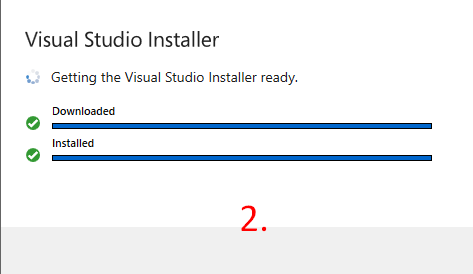
- Wait for the Visual Studio Installer to get ready. This involves downloading and installing necessary files. (Image 2)
- Select your preferred installation locations for the Visual Studio IDE and other components. (Image 3)
- Click "Install" to begin the installation process.
Wait for the installation to complete and then launch Visual Studio from the Start menu or desktop.
Activating Visual Studio:
- Open Visual Studio.
- Click on "Help" in the top menu.
- Select "Register Visual Studio."
- Enter your product key to unlock.













































 Lifetime License


