If you'd like to buy a big amount of copies, please contact [email protected] The code is valid for 1 pc / 1 installation - if you uninstall/reinstall you might need to buy a new code.
Microsoft Office 2016 Pro Plus (Phone Activation) (Lifetime License / Global)
Microsoft Office 2016 Pro Plus (Phone Activation) (Lifetime License / Global)
Rating

Reviews
Price
  • $1.71
cards klarna GPay Apple Pay affirm afterpay

Official License: Global | 24/7 U.S. Support | Gamers Outlet - CD Keys

Platform
Microsoft Lifetime License
Points Gained
1
Availability
In Stock
Support
24/7 Support
Delivery
Free digital delivery
Your Region
Supported
Available Options for Office 2016 options

$1.71

Instant Activation: Microsoft Office 2016 Pro Plus (Phone Activation) (Lifetime License / Global) CD Key
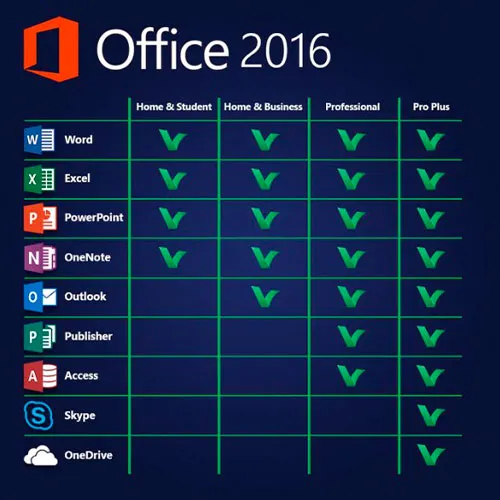
This version of MS Office 2016 contains Word, Excel, PowerPoint, One Note, Outlook, Publisher, Skype for Business and Access to be used permanently on 1 PC (can be used only once).Create form letters or databases, manage figures and tables, design presentations, organize eMails, and more!

Microsoft Office Professional Plus 2016 is aimed primarily at companies and meets even the highest expectations. Containing the programs Word, Excel, PowerPoint, OneNote, Outlook, Publisher, Access and Skype for Business, Office Professional Plus 2016 meets all the requirements that are placed on an extensive office software. Whether you create form letters, manage figures and tables, design presentations, create databases or want to organize your eMails - your professional or private projects can be done with the Office applications in no time.


ACTIVATION INSTRUCTIONS:

1. Download the official installer from this link: Here
2. Enter the product key you received from us to activate the software.
3. Select the "Activate by Phone" option.

For more detailed instructions, please visit the download section and click on the "How to Activate" button.


We Also Offer Windows 11 cd keys HERE
Windows 10 cd keys HERE
Office 2021 cd keys HERE

  • Will I get an invoice?
    Invoice will automatically generate upon placing an order.

  • Where can I find my invoice?
    Once the order is completed, the invoice will be available under 'My Account' (top right corner of the top bar) -> 'Order History.'

  • Can I edit my invoice?
    Currently, you cannot do this yourself. Please contact our support via email at [email protected], and we will be glad to assist you with the matter. For a faster process, please include the order number and any relevant information you want to be shown (such as your name, ID/tax number, etc.).

  • Can I install this on macOS?
    No, this product does not support MacOS.

  • Can I redeem this product anywhere?
    Yes, this Product is a Global version.

  • Can I transfer this product to new hardware?
    No, The code is valid for 1 pc or 1 installation - if you uninstall or reinstall you might need to buy a new code.

  • Is there a specific way I need to install this product?
    Please read the 'Activation' tab.

  • What if I need a COA sticker for that product?
    The COA label print can be scanned and sent to you upon request, for an additional charge.

ACTIVATION INSTRUCTIONS:

Download the official ISO/image to activate: https://officecdn.microsoft.com/pr/492350f6-3a01-4f97-b9c0-c7c6ddf67d60/media/en-US/ProPlusRetail.img

1-After installation, open Word (or any Office app)
When the Office Activation Wizard appears, select “Activate by phone.”
The wizard will display your Installation ID (IID) - you will need this shortly.
The IID is shown as 9 groups of 7 digits.

2-Go to the activation website
Open your browser and go to: https://aka.ms/aoh

3-Sign in
Choose Microsoft Account as the login method and sign in with your Microsoft account.

4-Select “Activate a Microsoft Product”
On the first page, click Activate a Microsoft Product.

5-Choose the product type
Select the category that matches what you are activating:

  • Windows → for Windows activation
  • Microsoft Office → for Office, Project, or Visio
  • Windows Server, etc., if applicable

Note: For Project and Visio, choose Microsoft Office.

6-Select your operating system

7-Choose the product version
Select the version you are activating, for example:

  • Office / Project / Visio 2024
  • Office / Project / Visio 2021
  • Office / Project / Visio 2019, etc.

8-Enter your Installation ID (IID)
You will see nine empty boxes.
Enter each group of digits from your IID into the matching box (9 groups of 7 digits).
When finished, submit the form to continue.

9-Answer the usage question
When asked, “How many computers have you installed this copy on?”
Type 0, then continue.

10-Receive your Confirmation ID
The website will display your Confirmation ID.

11-Enter the Confirmation ID into your PC
Return to the Office activation wizard and enter the Confirmation ID to finish activation.


Video Guide:


Jorge López 30/07/2026

Todo bien, windows no me dejaba activarlo por telefono por falta de soporte en España, escribí a Gamers Outlet y me dieron ellos el codigo de verificación. Todo perfecto.

Md Mahabub Islam 27/05/2026

fast n easy is about 16 minutes because you need spell digits and AI robot on phone veryfing input and then saying activation code twice to check and then there are some delays with AI robot but works. Recommended

bry 08/11/2025

Works great. Have to use automated phone activation.

Jesus Alberto Martinez 21/10/2025

Todo correcto y muy rapido

Edu 21/10/2025

Worth it. All worked. thanks

Write a review

Note: HTML is not translated!
Captcha
Review Score: 5 / 5
Jorge López 30/07/2026

Todo bien, windows no me dejaba activarlo por telefono por falta de soporte en España, escribí a Gamers Outlet y me dieron ellos el codigo de verificación. Todo perfecto.

Md Mahabub Islam 27/05/2026

fast n easy is about 16 minutes because you need spell digits and AI robot on phone veryfing input and then saying activation code twice to check and then there are some delays with AI robot but works. Recommended

bry 08/11/2025

Works great. Have to use automated phone activation.

Jesus Alberto Martinez 21/10/2025

Todo correcto y muy rapido

Edu 21/10/2025

Worth it. All worked. thanks

Support