




Zum Aktivieren/Installieren/Spielen des Spiels auf Steam wird ein russisches VPN benötigt!
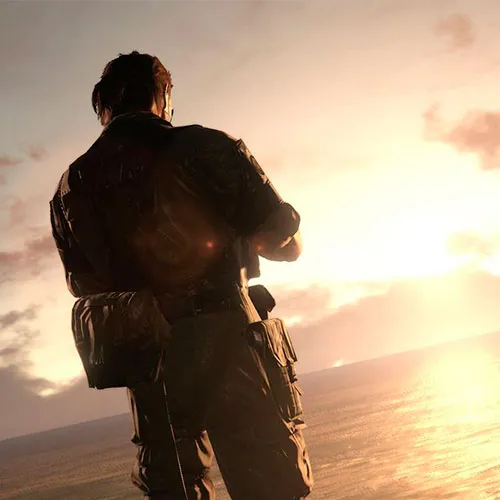
Metal Gear Solid V: The Phantom Pain RU (PC Steam-Key / russisches VPN)


Metal Gear Solid V: The Phantom Pain RU (PC Steam-Key / russisches VPN)

Bewertung

Bewertungen
Preis
  • $28.75
cards klarna GPay Apple Pay affirm afterpay

Offizielle Lizenz: Russisches VPN | Support aus den USA rund um die Uhr | Gamers Outlet – CD-Keys

Plattform
Steam PC Steam Key
Bonuspunkte
25
Erzielte Punkte
Auf Lager
Support
24/7 Support
Lieferung
Kostenlose digitale Lieferung
Ihre Region
Unterstützt

$28.75

Metal Gear Solid V: The Phantom Pain CD-Key RU Steam

- Ein Open-World-Spieldesign, das den Spielern ultimative Freiheit bei der Herangehensweise an Missionen und beim allgemeinen Spielfortschritt bietet

- Die Fox Engine sorgt für fotorealistische Grafik, durchdachtes Spieldesign und echte Produktionsqualität der nächsten Generation

- Online-Konnektivität, die das Spielerlebnis über die Konsolen hinaus auf andere Geräte ausweitet und so die Gesamtfunktionalität sowie den Zugang zum Spiel erweitert


Befolgen Sie die Anweisungen, um die ungekürzte Version des Spiels zu aktivieren:
1. BEENDEN SIE STEAM.
2. Gehen Sie zu: http://www.flyvpn.com/freetrial
3. Befolgen Sie anschließend die Schritte 1 und 2: http://i.imgur.com/kvHzh3o.png
4. Schritt 1: Herunterladen des Programms und Ausführen
5. Schritt 2: Verwende den Test-Benutzernamen und das Passwort, die du erhältst: http://i.imgur.com/mnA3AwG.png
6. Wähle aus der Liste ein Land aus, für das keine Einschränkungen gelten (beachte, dass es Registerkarten mit verschiedenen Ländern gibt) – klicke auf „Verbinden“
7. Melde dich bei deinem Steam-Konto an
8. Löse den Schlüssel ein
9. Viel Spaß! LASS DEIN VPN WÄHREND DES INSTALLIERENS UND DES SPIELENS GEÖFFNET.


Please follow the steps below to redeem your Steam key:

1) Download and install the Steam client on your PC: https://store.steampowered.com/about/
2) Open the Steam client, log in or create an account if you don't have one, and locate the Games tab on the top menu. Click this and then select "Activate a Product on Steam…"


3) Enter your code into the product activation field


Your game is now viewable in the "Library" tab and is available to download/install when you're ready.
Happy Gaming!

Titus Standing 14.03.2022

The fantastic range of products, competitive prices, and exceptional customer service make this website a top choice for online shopping. I highly recommend it to others.

+ Bewertung

Hinweis: HTML ist nicht verfügbar!
Captcha
Review Score: 5 / 5
Titus Standing 14.03.2022

The fantastic range of products, competitive prices, and exceptional customer service make this website a top choice for online shopping. I highly recommend it to others.

Support