Office 2019 para Mac funciona con macOS Big Sur y versiones posteriores.
Solo funciona en MAC. No se puede activar en Japón ni en Brasil.
NO FUNCIONA EN VERSIONES ANTIGUAS DE macOS
Microsoft Office 2019 para el hogar y la empresa (Mac / Licencia vinculada a una cuenta) (Licencia de por vida / Global)
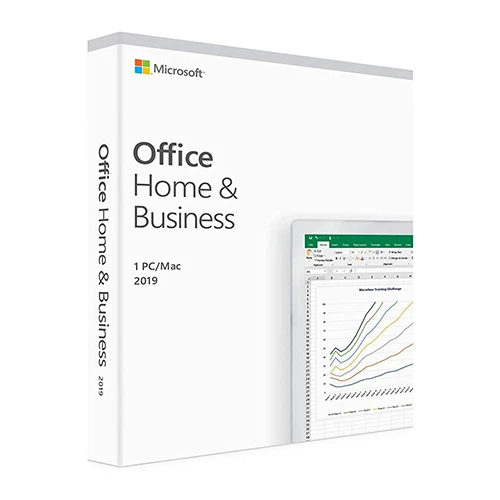


Microsoft Office 2019 para el hogar y la empresa (Mac / Licencia vinculada a una cuenta) (Licencia de por vida / Global)

Clasificación:

Precio
  • $16.66
cards klarna GPay Apple Pay affirm afterpay

Licencia oficial: Global | Asistencia en EE. UU. 24 horas al día, 7 días a la semana | Gamers Outlet - Claves de CD

Plataforma
Microsoft Lifetime License
Puntos ganados
14
Existencia
Agotado
Soporte
24/7 Soporte
Entrega
Entrega digital gratuita
Tu región
Compatible
Opciones disponibles para Office 2019 options

$16.66

Activación inmediata: Microsoft Office 2019 Home and Business (Mac / Licencia vinculada a la cuenta) (Licencia de por vida / Global) Clave de CD
Aprovecha al máximo tu tiempo: Office 2019 está diseñado para ayudarte a crear y organizar más rápido gracias a sus funciones que te ahorran tiempo, un nuevo diseño moderno y herramientas de colaboración integradas. Además, puedes guardar tus documentos en la nube en OneDrive y acceder a ellos desde cualquier lugar. 

Requisitos del sistema: Office 2019 Home y Business está disponible en versión de 64 bits. Compatible con macOS Monterey 12 y versiones posteriores. 

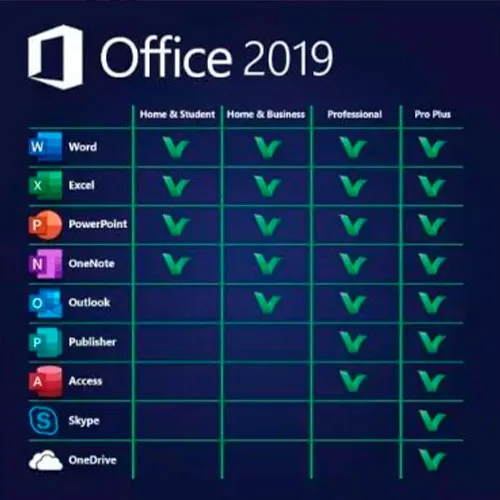
Incluye: Word 2019, Excel 2019, PowerPoint 2019, OneNote 2019 y Outlook 2019

INSTRUCCIONES DE ACTIVACIÓN

1 – Accede a la página web oficial de activación https://setup.office.com/redeem/enter-key

2 – Canjea el código.

También ofrecemos claves de CD de Windows 11 AQUÍ
Windows 10 claves de CD AQUÍ
Office 2021 claves de CD AQUÍ

  • ¿Recibiré una factura?
    La factura se generará automáticamente al realizar el pedido.

  • ¿Dónde puedo encontrar mi factura?
    Una vez completado el pedido, la factura estará disponible en 'Mi cuenta' (esquina superior derecha de la barra superior) -> 'Historial de pedidos'.

  • ¿Puedo editar mi factura?
    Actualmente, no puede realizar esta acción usted mismo. Por favor, póngase en contacto con nuestro servicio de asistencia por correo electrónico a [email protected] y con gusto le ayudaremos. Para agilizar el proceso, incluya el número de pedido y cualquier información relevante que desee que se muestre (como su nombre, número de identificación fiscal, etc.).

  • ¿Puedo instalar esto en macOS?
    Sí, este producto es compatible con macOS (requiere la versión Monterey o superior).

  • ¿Puedo canjear este producto en algún sitio?
    Sí, este producto es una versión global.

  • ¿Puedo transferir este producto a un nuevo hardware?
    Sí, esta clave se puede vincular a tu cuenta de Microsoft.

  • ¿Hay alguna forma específica en la que deba instalar este producto?
    Por favor, lea la pestaña 'Activación'.

  • ¿Qué ocurre si necesito una etiqueta de certificado de análisis (COA) para ese producto?
    Si lo solicita, podemos escanear y enviárselo la etiqueta del certificado de análisis (COA) por un cargo adicional.

ACTIVATION INSTRUCTIONS

1 – Navigate to the official activation website https://setup.office.com/redeem/enter-key

2 – Redeem the code.

Notice:

At the end of the installation, a window may appear stating that an Office upgrade is required.
Please note that selecting this option will upgrade your installation to Office 365/2024, which will prevent you from fully activating Office 2016/2019.
If you attempt to log in after this upgrade,  Office will not be able to locate a valid license for your current installation.
This is due to recent updates, which require an Office 2021/2024 license or an active Office 365 subscription (version 16.90 and later).

To avoid this, skip any Office updates offered during the installation process.
Also, uncheck the option to "Automatically keep Microsoft apps up to date."
After that, simply click the red "X" at the top left of the window, log in with your Microsoft account, and complete the activation process.


bénédicte 26/05/2026

bonjour est ce que ça fonctionne pour IOS Ventura 13? merci +++

Juby Zacharias 24/05/2026

The quick support help me to solve an issue with the MacOS version on my Mac.
I am very satisfied with the this product. Very easy process to buy, activate and install. It all worked just fine.

Gus Vargas 20/09/2024

I am very satisfied with the purchase of this product. Very easy process to buy, activate and install. It all worked just fine. Gamers outlet is my number one choice. very reliable. Thanks a million.

Roberto 15/07/2024

All ok. The quick support help me to solve an issue with the MacOS version on my Mac, too old.

Utkarsh 20/03/2024

The redemption process was super easy, it takes you to the MyDrive website for redemption. I could download and install and get working within 5 minutes. So good experience.

Escribir Opinión

Nota: No se permite HTML!
Captcha
Review Score: 5 / 5
bénédicte 26/05/2026

bonjour est ce que ça fonctionne pour IOS Ventura 13? merci +++

Juby Zacharias 24/05/2026

The quick support help me to solve an issue with the MacOS version on my Mac.
I am very satisfied with the this product. Very easy process to buy, activate and install. It all worked just fine.

Gus Vargas 20/09/2024

I am very satisfied with the purchase of this product. Very easy process to buy, activate and install. It all worked just fine. Gamers outlet is my number one choice. very reliable. Thanks a million.

Roberto 15/07/2024

All ok. The quick support help me to solve an issue with the MacOS version on my Mac, too old.

Utkarsh 20/03/2024

The redemption process was super easy, it takes you to the MyDrive website for redemption. I could download and install and get working within 5 minutes. So good experience.

Support