Activación inmediata: Microsoft Office 2019 Pro Plus (activación por teléfono) (licencia de por vida / Global) Clave de CD
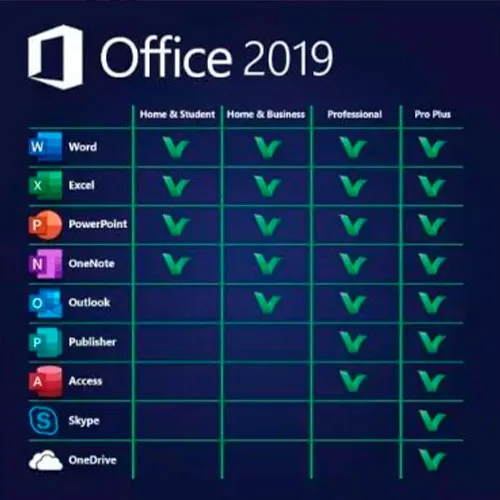
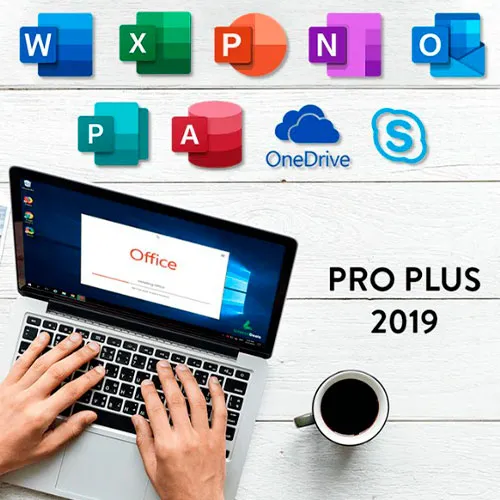
Microsoft Office 2019 Professional Plus incluye las versiones clásicas de 2019 de Word, Excel, PowerPoint, OneNote, Outlook, Access, Publisher y Skype Empresarial.
Office 2019 Professional Plus es una potente herramienta que nos resulta útil a los usuarios finales casi a diario. Para el trabajo, para los estudios, para tomar notas y para enviar correos electrónicos. Office 2019 Pro Plus ofrece un nuevo diseño y nuevas funciones que nos facilitarán aún más la vida. ¡Date prisa y hazte con tu propia copia al precio más barato del mercado! Stock garantizado con asistencia 24/7.
INSTRUCCIONES DE ACTIVACIÓN:
1. Descarga el instalador oficial desde este enlace:
Aquí2. Introduce la clave de producto que te hemos enviado para activar el software.
3. Selecciona la opción «Activar por teléfono».
Para obtener instrucciones más detalladas, visita la sección de Descargar y haz clic en el botón «Cómo activar».
También ofrecemos Windows 11 claves de CD AQUÍ Windows 10 claves de CD AQUÍ Office 2021 claves de CD AQUÍ 
- ¿Recibiré una factura?
La factura se generará automáticamente al realizar el pedido.
- ¿Dónde puedo encontrar mi factura?
Una vez completado el pedido, la factura estará disponible en 'Mi cuenta' (esquina superior derecha de la barra superior) -> 'Historial de pedidos'.
- ¿Puedo editar mi factura?
Actualmente, no puede realizar esta acción usted mismo. Por favor, póngase en contacto con nuestro servicio de asistencia por correo electrónico a [email protected] y con gusto le ayudaremos. Para agilizar el proceso, incluya el número de pedido y cualquier información relevante que desee que se muestre (como su nombre, número de identificación fiscal, etc.).
- ¿Puedo instalar esto en macOS?
No, este producto no es compatible con MacOS.
- ¿Puedo canjear este producto en algún sitio?
Sí, este producto es una versión global.
- ¿Puedo transferir este producto a un nuevo hardware?
No, el código es válido para 1 PC o 1 instalación; si desinstala o reinstala, es posible que deba comprar un nuevo código.
- ¿Hay alguna forma específica en la que deba instalar este producto?
Por favor, lea la pestaña 'Activación'.
- ¿Qué ocurre si necesito una etiqueta de certificado de análisis (COA) para ese producto?
Si lo solicita, podemos escanear y enviarle la etiqueta del certificado de análisis (COA) por un cargo adicional.
ACTIVATION INSTRUCTIONS:
Download the official ISO/image to activate: https://officecdn.microsoft.com/pr/492350f6-3a01-4f97-b9c0-c7c6ddf67d60/media/en-US/ProPlus2019Retail.img
1-After installation, open Word (or any Office app)
When the Office Activation Wizard appears, select “Activate by phone.”
The wizard will display your Installation ID (IID) - you will need this shortly.
The IID is shown as 9 groups of 7 digits.
2-Go to the activation website
Open your browser and go to: https://aka.ms/aoh
3-Sign in
Choose Microsoft Account as the login method and sign in with your Microsoft account.
4-Select “Activate a Microsoft Product”
On the first page, click Activate a Microsoft Product.
5-Choose the product type
Select the category that matches what you are activating:
- Windows → for Windows activation
- Microsoft Office → for Office, Project, or Visio
- Windows Server, etc., if applicable
Note: For Project and Visio, choose Microsoft Office.
6-Select your operating system
7-Choose the product version
Select the version you are activating, for example:
- Office / Project / Visio 2024
- Office / Project / Visio 2021
- Office / Project / Visio 2019, etc.
8-Enter your Installation ID (IID)
You will see nine empty boxes.
Enter each group of digits from your IID into the matching box (9 groups of 7 digits).
When finished, submit the form to continue.
9-Answer the usage question
When asked, “How many computers have you installed this copy on?”
Type 0, then continue.
10-Receive your Confirmation ID
The website will display your Confirmation ID.
11-Enter the Confirmation ID into your PC
Return to the Office activation wizard and enter the Confirmation ID to finish activation.
For other Office languages, scroll down here: https://gamersoutlet.zendesk.com/hc/en-us/articles/360058263113-Office-2019-pro-plus-activation-methods
Video Guide:









































 Lifetime License


