Si desea adquirir una gran cantidad de copias, póngase en contacto con [email protected].
Esta es la versión para minoristas de la activación telefónica de Office 2019.
El código es válido para 1 PC / 1 instalación; si desinstala y vuelve a instalar el programa, es posible que deba comprar un nuevo código.
Microsoft Office 2019 Pro Plus Retail (Activación por teléfono) (Licencia de por vida / Global)

Microsoft Office 2019 Pro Plus Retail (Activación por teléfono) (Licencia de por vida / Global)
Clasificación:

Precio
  • $8.63
cards klarna GPay Apple Pay affirm afterpay

Licencia oficial: Global | Asistencia en EE. UU. 24 horas al día, 7 días a la semana | Gamers Outlet - Claves de CD

Plataforma
Microsoft Lifetime License
Puntos ganados
7
Existencia
En stock
Soporte
24/7 Soporte
Entrega
Entrega digital gratuita
Tu región
Compatible
Opciones disponibles para Office 2019 options

$8.63

Activación inmediata: Microsoft Office 2019 Pro Plus Retail (activación por teléfono) (licencia de por vida / Global) Clave de CD

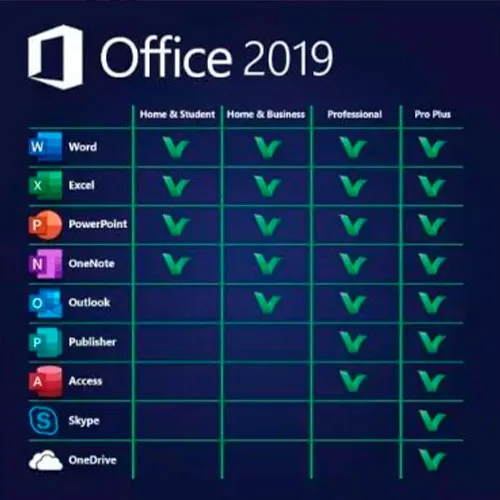
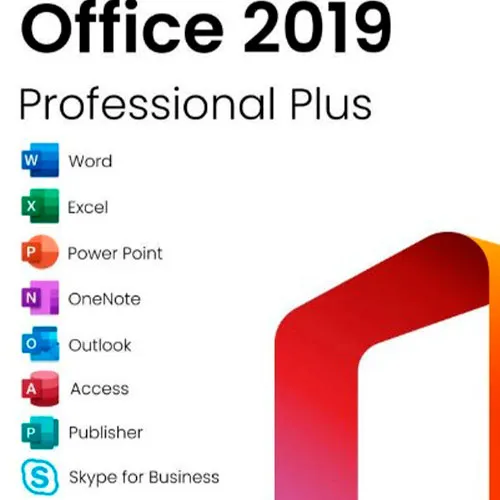
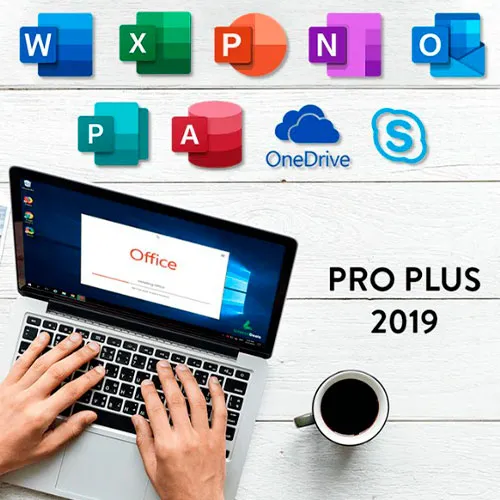
Microsoft Office 2019 Professional Plus incluye las versiones clásicas de 2019 de Word, Excel, PowerPoint, OneNote, Outlook, Access, Publisher y Skype Empresarial.

Office 2019 Professional Plus es una potente herramienta que nos resulta útil a los usuarios finales casi a diario. Para el trabajo, para los estudios, para tomar notas y para enviar correos electrónicos. Office 2019 Pro Plus ofrece un nuevo diseño y nuevas funciones que ¡nos facilitarán aún más la vida! Date prisa y hazte con tu propia copia al precio más barato del mercado. Stock garantizado con asistencia 24/7.

INSTRUCCIONES DE ACTIVACIÓN:

1. Descarga el instalador oficial desde este enlace: Aquí
2. Introduce la clave de producto que te hemos enviado para activar el software.
3. Selecciona la opción «Activar por teléfono».

Para obtener instrucciones más detalladas, visita la sección de Descargar y haz clic en el botón «Cómo activar».

  • ¿Recibiré una factura?
    La factura se generará automáticamente al realizar el pedido.

  • ¿Dónde puedo encontrar mi factura?
    Una vez completado el pedido, la factura estará disponible en 'Mi cuenta' (esquina superior derecha de la barra superior) -> 'Historial de pedidos'.

  • ¿Puedo editar mi factura?
    Actualmente, no puede realizar esta acción usted mismo. Por favor, póngase en contacto con nuestro servicio de asistencia por correo electrónico a [email protected] y con gusto le ayudaremos. Para agilizar el proceso, incluya el número de pedido y cualquier información relevante que desee que se muestre (como su nombre, número de identificación fiscal, etc.).

  • ¿Puedo instalar esto en macOS?
    No, este producto no es compatible con MacOS.

  • ¿Puedo canjear este producto en algún sitio?
    Sí, este producto es una versión global.

  • ¿Puedo transferir este producto a un nuevo hardware?
    No, el código es válido para 1 PC o 1 instalación; si desinstala o reinstala, es posible que deba comprar un nuevo código.

  • ¿Hay alguna forma específica en la que deba instalar este producto?
    Por favor, lea la pestaña 'Activación'.

  • ¿Qué ocurre si necesito una etiqueta de certificado de análisis (COA) para ese producto?
    Si lo solicita, podemos escanear y enviárselo la etiqueta del certificado de análisis (COA) por un cargo adicional.

ACTIVATION INSTRUCTIONS:

Download the official ISO/image to activate: https://officecdn.microsoft.com/pr/492350f6-3a01-4f97-b9c0-c7c6ddf67d60/media/en-US/ProPlus2019Retail.img 

1-After installation, open Word (or any Office app)
When the Office Activation Wizard appears, select “Activate by phone.”
The wizard will display your Installation ID (IID) - you will need this shortly.
The IID is shown as 9 groups of 7 digits.

2-Go to the activation website
Open your browser and go to: https://aka.ms/aoh

3-Sign in
Choose Microsoft Account as the login method and sign in with your Microsoft account.

4-Select “Activate a Microsoft Product”
On the first page, click Activate a Microsoft Product.

5-Choose the product type
Select the category that matches what you are activating:

  • Windows → for Windows activation
  • Microsoft Office → for Office, Project, or Visio
  • Windows Server, etc., if applicable

Note: For Project and Visio, choose Microsoft Office.

6-Select your operating system

7-Choose the product version
Select the version you are activating, for example:

  • Office / Project / Visio 2024
  • Office / Project / Visio 2021
  • Office / Project / Visio 2019, etc. 

8-Enter your Installation ID (IID)
You will see nine empty boxes.
Enter each group of digits from your IID into the matching box (9 groups of 7 digits).
When finished, submit the form to continue.

9-Answer the usage question
When asked, “How many computers have you installed this copy on?”
Type 0, then continue.

10-Receive your Confirmation ID
The website will display your Confirmation ID.

11-Enter the Confirmation ID into your PC
Return to the Office activation wizard and enter the Confirmation ID to finish activation.


For other Office languages, scroll down here: https://gamersoutlet.zendesk.com/hc/en-us/articles/360058263113-Office-2019-pro-plus-activation-methods 

Video Guide:


Frank 10/11/2023

Wasn't 100% sure on activation so contacted Support. In just a few minutes they replied with the necessary information. Activation of Office 2019 Pro was successful. Thank you!

Konstantinos 14/04/2023

Purchased a phone activation key. During the activation, I got informed that the key was not valid.
After contacting the support, they provide me immediately with a valid key and activated my product.
I will buy again for sure!

Saj Gul 24/01/2023

First class service and delivery

Saj Gul 24/01/2023

First class delivery and service

Zoilo Garcia 10/01/2023

Habria que renovarlas anualmente o son perpetuas?

Escribir Opinión

Nota: No se permite HTML!
Captcha
Review Score: 5 / 5
Frank 10/11/2023

Wasn't 100% sure on activation so contacted Support. In just a few minutes they replied with the necessary information. Activation of Office 2019 Pro was successful. Thank you!

Konstantinos 14/04/2023

Purchased a phone activation key. During the activation, I got informed that the key was not valid.
After contacting the support, they provide me immediately with a valid key and activated my product.
I will buy again for sure!

Saj Gul 24/01/2023

First class service and delivery

Saj Gul 24/01/2023

First class delivery and service

Zoilo Garcia 10/01/2023

Habria que renovarlas anualmente o son perpetuas?

Support