Fallout 4 Cd Key Steam China VPN Multilanguage

Fallout 4 Cd Key Steam China VPN Multilanguage

דירוג

ביקורות
מְחִיר
  • $5.92
cards klarna GPay Apple Pay affirm afterpay
פּלַטפוֹרמָה
Steam Steam
נקודות שנצברו
5
זמינות
במלאי
תמיכה
תמיכה 24/7
משלוח
משלוח דיגיטלי חינם
האזור שלך
לא נתמך
$5.92

שפות זמינות: EN, DE, ES, FR, IT
  
דורש VPN סינית להפעלה.
לאחר ההפעלה - המשחק הוא רב-שפות וללא אזורים (לא דורש VPN כדי לשחק).

כיצד להפעיל באמצעות VPN --> בניגוד לסרטון, ודא שאתה בוחר בסין ולא ברוסיה.
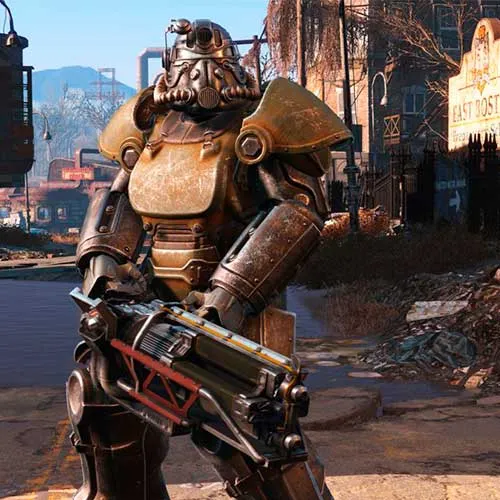
Bethesda Game Studios, היוצרים עטורי הפרסים של Fallout 3 ו-The Elder Scrolls V: Skyrim, מברכים אותך לעולם של Fallout 4 - המשחק השאפתני ביותר שלהם אי פעם, והדור הבא של משחקי עולם פתוח.

  • האם אקבל חשבונית?
    חשבונית תופק אוטומטית עם ביצוע הזמנה.

  • היכן אוכל למצוא את החשבונית שלי?
    לאחר השלמת ההזמנה, החשבונית תהיה זמינה תחת 'החשבון שלי' (בפינה השמאלית העליונה של הסרגל העליון) -> 'היסטוריית הזמנות'.

  • האם אוכל לערוך את החשבונית שלי?
    נכון לעכשיו, אתה לא יכול לעשות זאת בעצמך. אנא צור קשר עם התמיכה שלנו באמצעות דואר אלקטרוני בכתובת [email protected], ואנו נשמח לסייע לך בעניין. לתהליך מהיר יותר, אנא כלול את מספר ההזמנה וכל מידע רלוונטי שברצונך שיוצג (כגון שמך, מספר תעודת זהות/מס וכו').

  • האם המוצר הזה מתאים לכל פלטפורמה?
    לא, מוצר זה ספציפי לפלטפורמת Steam.

  • האם אני יכול לממש את המוצר הזה בכל מקום?
    לא, ניתן להפעיל את המוצר הזה רק מסין.
    אנא לחץ על הלחצן 'בדוק את האזור שלך' כדי לראות את כל המדינות הנתמכות.


  • האם המוצר הזה הוא משחק, קרדיט, מנוי או DLC?
    מוצר זה הוא משחק הבסיס.

  • האם אני יכול להעביר את המשחק הזה לחומרה חדשה או לקונסולה חדשה?
    כן, מפתח זה נקשר לחשבון Steam שלך.

  • האם יש דרך ספציפית שאני צריך להתקין את המוצר הזה?
    אנא קרא את הכרטיסייה 'הפעלה'.

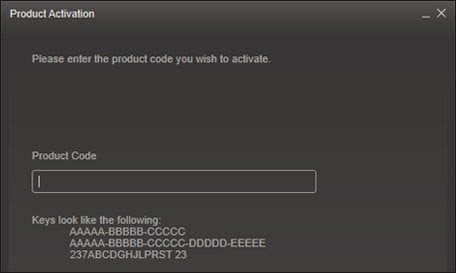
Please follow the steps below to redeem your Steam key:

1) Download and install the Steam client on your PC: https://store.steampowered.com/about/
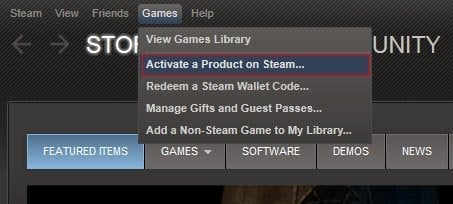
2) Open the Steam client, log in or create an account if you don't have one, and locate the Games tab on the top menu. Click this and then select "Activate a Product on Steam…"


3) Enter your code into the product activation field


Your game is now viewable in the "Library" tab and is available to download/install when you're ready.
Happy Gaming!

ben mayfield 08/10/2022

I've had nothing but positive experiences shopping on this website. The product selection is extensive, and the customer service is always prompt and courteous. Highly recommended!

Stelios 06/12/2015

Followed the instructions and worked perfectly.

Saved me 30 euros :).

Thorsten 26/11/2015

Worked very well if you follow the guide provided here.
Very skilled and friendly support, helped me via TeamViewer
Everytime again

David 19/11/2015

Fast delivery , then activate follow the instructions . Worked for me, and awesome price.

Peers 19/11/2015

Instant key delivery (like 2 sec after purchase) and perfectly easy activation. Just went to FlyVPN like the video describes, got a free trial acc and opened a VPN to China/Bejing. Then started steam and selected download region China, restart Steam, activate Fallout 4, restart Steam again and chose Europe Server to start download the Game in English/German etc :) worked great and was so cheap, poor Bethesda :/

כתוב סקירה

הערה HTML אינו מתורגם!
Captcha
Review Score: 5 / 5
ben mayfield 08/10/2022

I've had nothing but positive experiences shopping on this website. The product selection is extensive, and the customer service is always prompt and courteous. Highly recommended!

Stelios 06/12/2015

Followed the instructions and worked perfectly.

Saved me 30 euros :).

Thorsten 26/11/2015

Worked very well if you follow the guide provided here.
Very skilled and friendly support, helped me via TeamViewer
Everytime again

David 19/11/2015

Fast delivery , then activate follow the instructions . Worked for me, and awesome price.

Peers 19/11/2015

Instant key delivery (like 2 sec after purchase) and perfectly easy activation. Just went to FlyVPN like the video describes, got a free trial acc and opened a VPN to China/Bejing. Then started steam and selected download region China, restart Steam, activate Fallout 4, restart Steam again and chose Europe Server to start download the Game in English/German etc :) worked great and was so cheap, poor Bethesda :/