אם תרצה לקנות כמות גדולה של עותקים, אנא צור קשר עם [email protected]
Office 2019 Professional Plus Cd Key Phone Activation

Office 2019 Professional Plus Cd Key Phone Activation

דירוג

ביקורות
מְחִיר
  • $3.47
cards klarna GPay Apple Pay affirm afterpay
פּלַטפוֹרמָה
Microsoft Windows Microsoft Office
נקודות שנצברו
2
זמינות
במלאי
תמיכה
תמיכה 24/7
משלוח
משלוח דיגיטלי חינם
האזור שלך
נתמך
אפשרויות זמינות עבור Office 2019 options

$3.47

חשבונית תופק אוטומטית עם ביצוע הזמנה

שפות זמינות: MULTILANGUAGE

הוראות הפעלה:

1. הורד את המתקין הרשמי מהקישור הזה: כאן
2. הזינו את מפתח המוצר שקיבלתם מאיתנו להפעלת התוכנה.
3. בחר באפשרות "הפעל באמצעות הטלפון".
4. התקשר למספר הטלפון המצוין בהנחיות ההפעלה.
5. בצע את ההוראות בהודעה הקולית במהלך השיחה.

להנחיות מפורטות יותר, בקר בסעיף ההורדה ולחץ על כפתור "כיצד להפעיל".

לא עובד על MacBook ! חפש את סרגל החיפוש בית ועסק @.

הקוד תקף להתקנה של 1 pc/1. אם תסיר/תתקין מחדש, ייתכן שיהיה עליך לקנות קוד חדש.

לא עובד במכשירי אפל אנדרואיד/ChromeOS/iOS. תואם רק עם Windows 10, Windows 11.

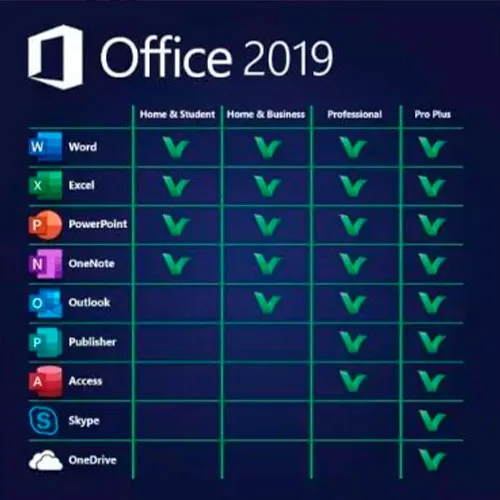
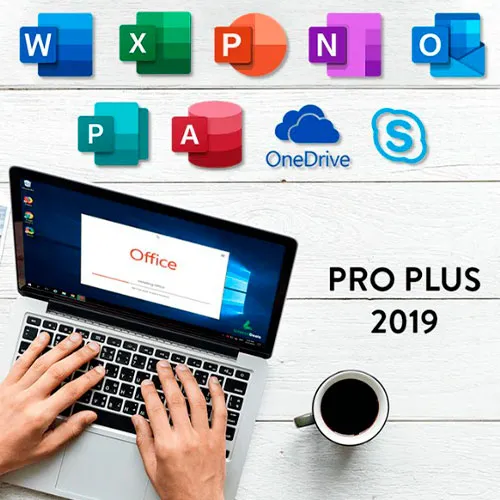
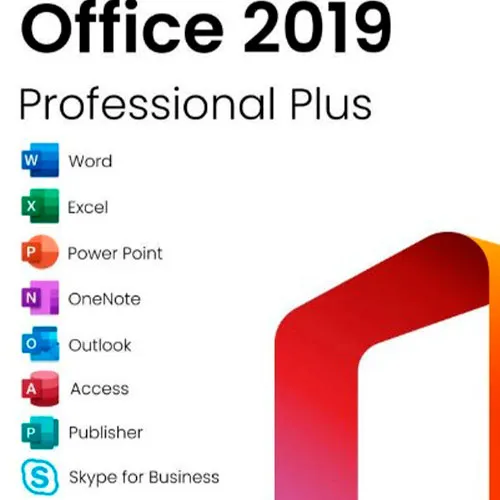
Microsoft Office 2019 Professional Plus כולל גרסאות קלאסיות משנת 2019 של Word, Excel, PowerPoint, OneNote, Outlook, Access, Publisher, Skype for Business.

Office 2019 professional plus הוא כלי רב עוצמה המשרת אותנו כמשתמשי קצה כמעט על בסיס יומיומי. לעבודה, כסטודנט, להערות ולמייל. Office 2019 pro plus מספק עיצוב חדש ותכונות חדשות שיהפכו את חיינו לקלים עוד יותר! מהרו וקחו עותק משלכם במחיר הזול ביותר בסביבה. מלאי מובטח עם תמיכה 24/7.

אנו מציעים גם מפתחות CD של Windows 11 כאן
מפתחות CD של Windows 10 כאן
מפתחות CD של Office 2021
כאן

  • האם אקבל חשבונית?
    חשבונית תופק אוטומטית עם ביצוע ההזמנה.

  • איפה אני יכול למצוא את החשבונית שלי?
    לאחר השלמת ההזמנה, החשבונית תהיה זמינה תחת 'החשבון שלי' (בפינה השמאלית העליונה של הסרגל העליון) -> 'היסטוריית הזמנות'.

  • האם אוכל לערוך את החשבונית שלי?
    נכון לעכשיו, אתה לא יכול לעשות זאת בעצמך. אנא צור קשר עם התמיכה שלנו באמצעות דוא"ל בכתובת [email protected], ואנו נשמח לסייע לך בעניין. לתהליך מהיר יותר, אנא כלול את מספר ההזמנה וכל מידע רלוונטי שברצונך שיוצג (כגון שמך, מספר תעודת זהות/מס וכו').

  • האם אני יכול להתקין את זה ב-macOS?
    לא, מוצר זה אינו תומך ב-MacOS.

  • האם אני יכול לממש את המוצר הזה בכל מקום?
    כן, המוצר הזה הוא גרסה גלובלית.

  • האם אוכל להעביר את המוצר הזה לחומרה חדשה?
    לא, הקוד תקף עבור מחשב אחד או התקנה אחת - אם תסיר התקנה או התקנה מחדש, ייתכן שיהיה עליך לקנות קוד חדש.

  • האם יש דרך ספציפית שאני צריך להתקין את המוצר הזה?
    אנא קרא את הכרטיסייה 'הפעלה'.

  • מה אם אני צריך מדבקת COA עבור המוצר הזה?
    את הדפסת תווית ה-COA ניתן לסרוק ולשלוח אליכם לפי בקשה, בתוספת תשלום.

ACTIVATION INSTRUCTIONS:

Download the official ISO/image to activate: https://officecdn.microsoft.com/pr/492350f6-3a01-4f97-b9c0-c7c6ddf67d60/media/en-US/ProPlus2019Retail.img

1-After installation, open Word (or any Office app)
When the Office Activation Wizard appears, select “Activate by phone.”
The wizard will display your Installation ID (IID) - you will need this shortly.
The IID is shown as 9 groups of 7 digits.

2-Go to the activation website
Open your browser and go to: https://aka.ms/aoh

3-Sign in
Choose Microsoft Account as the login method and sign in with your Microsoft account.

4-Select “Activate a Microsoft Product”
On the first page, click Activate a Microsoft Product.

5-Choose the product type
Select the category that matches what you are activating:

  • Windows → for Windows activation
  • Microsoft Office → for Office, Project, or Visio
  • Windows Server, etc., if applicable

Note: For Project and Visio, choose Microsoft Office.

6-Select your operating system

7-Choose the product version
Select the version you are activating, for example:

  • Office / Project / Visio 2024
  • Office / Project / Visio 2021
  • Office / Project / Visio 2019, etc. 

8-Enter your Installation ID (IID)
You will see nine empty boxes.
Enter each group of digits from your IID into the matching box (9 groups of 7 digits).
When finished, submit the form to continue.

9-Answer the usage question
When asked, “How many computers have you installed this copy on?”
Type 0, then continue.

10-Receive your Confirmation ID
The website will display your Confirmation ID.

11-Enter the Confirmation ID into your PC
Return to the Office activation wizard and enter the Confirmation ID to finish activation.


For other Office languages, scroll down here: https://gamersoutlet.zendesk.com/hc/en-us/articles/360058263113-Office-2019-pro-plus-activation-methods 

Video Guide:


Niko 25/10/2025

At first attempt I failed to activate, but at second call it was super!

VT1 29/09/2025

product was activated. good!

Hasinul AREFIN 15/09/2025

This is amazing. I am really impressed with this service. Have not faced any issue to install the MS Office.

Sandor Zakarias 05/08/2025

I was dubious, but its legit,!!! Australian Toll Free number is the one that works for Australia, goes through to the official Microsoft Activation Center...A n AI operator texts you a link to your mobile, which then sends you to the activation website specifically for you...(only works once , you have to ring again if you buy 2 which I eneded up doing) Type in the long string of numbers that come up on your computer after instalation and opening Word (And typing in the initial code given to you after the $6.15 purchase. and selecting Phone activation)
And then another code is generated that you type into your Word activation screen on your computer
Its alot of typing in numbers, but worth the effort for AU 6 bucks !! Enjoy

Kevin Oswaldo Magaña Pech 15/07/2025

Good, work, in from mexico

כתוב סקירה

הערה HTML אינו מתורגם!
Captcha
Review Score: 5 / 5
Niko 25/10/2025

At first attempt I failed to activate, but at second call it was super!

VT1 29/09/2025

product was activated. good!

Hasinul AREFIN 15/09/2025

This is amazing. I am really impressed with this service. Have not faced any issue to install the MS Office.

Sandor Zakarias 05/08/2025

I was dubious, but its legit,!!! Australian Toll Free number is the one that works for Australia, goes through to the official Microsoft Activation Center...A n AI operator texts you a link to your mobile, which then sends you to the activation website specifically for you...(only works once , you have to ring again if you buy 2 which I eneded up doing) Type in the long string of numbers that come up on your computer after instalation and opening Word (And typing in the initial code given to you after the $6.15 purchase. and selecting Phone activation)
And then another code is generated that you type into your Word activation screen on your computer
Its alot of typing in numbers, but worth the effort for AU 6 bucks !! Enjoy

Kevin Oswaldo Magaña Pech 15/07/2025

Good, work, in from mexico