אם ברצונכם לרכוש כמות גדולה של עותקים, אנא צרו קשר עם [email protected]
זוהי גרסת הקמעונאות של הפעלת הטלפון של אופיס 2019.
הקוד תקף למחשב אחד / התקנה אחת - אם תסיר/תתקין מחדש ייתכן שתצטרך לרכוש קוד חדש.
Microsoft Office 2019 Pro Plus Retail (הפעלה טלפונית) (רישיון לכל החיים / גלובלי)

Microsoft Office 2019 Pro Plus Retail (הפעלה טלפונית) (רישיון לכל החיים / גלובלי)
דירוג

ביקורות
מְחִיר
  • $8.63
cards klarna GPay Apple Pay affirm afterpay

רישיון רשמי: גלובלי | תמיכה בארה"ב 24/7 | Gamers Outlet - סידיקי

פּלַטפוֹרמָה
Microsoft Lifetime License
נקודות שנצברו
7
זמינות
במלאי
תמיכה
תמיכה 24/7
משלוח
משלוח דיגיטלי חינם
האזור שלך
נתמך
אפשרויות זמינות עבור Office 2019 options

$8.63

הפעלה מיידית: Microsoft Office 2019 Pro Plus Retail (הפעלה טלפונית) (רישיון לכל החיים / גלובלי) סידיקי
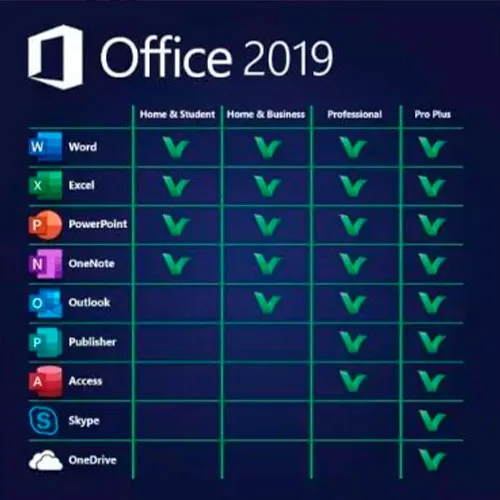
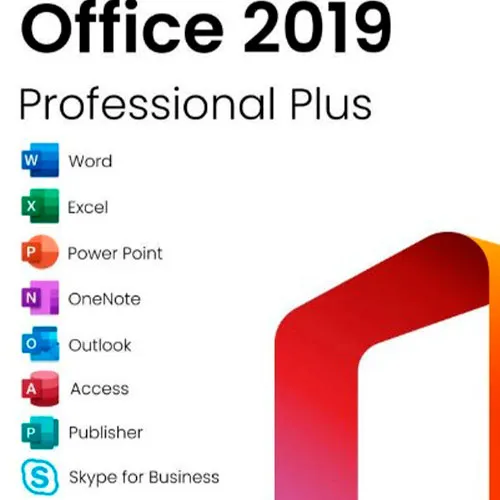
Microsoft Office 2019 Professional Plus כוללת את הגרסאות הקלאסיות של 2019 ל-Word, Excel, PowerPoint, OneNote, Outlook, Access, Publisher ו-Skype for Business.

Office 2019 Professional Plus הוא כלי רב עוצמה המשמש אותנו, המשתמשים הסופיים, כמעט על בסיס יומי. לעבודה, ללימודים, לרישום הערות ול- שליחת דוא"ל. Office 2019 Pro Plus מציעה עיצוב חדש ותכונות חדשות ש יקלו עוד יותר על חיינו! מהרו והשיגו עותק משלכם במחיר הזול ביותר בשוק. מלאי מובטח עם תמיכה 24/7.

הוראות הפעלה:

1. ביצוע הורדה של תוכנת ההתקנה הרשמית מהקישור הזה: כאן
2. הזינו את קוד המוצר שקיבלתם מאיתנו כדי להפעיל את התוכנה.
3. בחרו באפשרות "הפעלה בטלפון".

להוראות מפורטות יותר, אנא בקרו במדור ההורדות ולחצו על הכפתור "כיצד להפעיל".

  • האם אקבל חשבונית?
    חשבונית תיווצר אוטומטית עם ביצוע הזמנה.

  • היכן אוכל למצוא את החשבונית שלי?
    לאחר השלמת ההזמנה, החשבונית תהיה זמינה תחת 'החשבון שלי' (בפינה הימנית העליונה של הסרגל העליון) -> 'היסטוריית הזמנות'.

  • האם אני יכול לערוך את החשבונית שלי?
    נכון לעכשיו, אינך יכול לעשות זאת בעצמך. אנא צור קשר עם התמיכה שלנו באמצעות דוא"ל לכתובת [email protected], ונשמח לסייע לך בנושא. לקבלת תהליך מהיר יותר, אנא כלול את מספר ההזמנה וכל מידע רלוונטי שברצונך שיוצג (כגון שמך, מספר תעודת זהות/מס וכו').

  • האם אני יכול להתקין את זה על macOS?
    לא, מוצר זה אינו תומך ב-MacOS.

  • האם ניתן לממש את המוצר הזה בכל מקום?
    כן, מוצר זה הוא גרסה גלובלית.

  • האם ניתן להעביר את המוצר הזה לחומרה חדשה?
    לא, הקוד תקף למחשב אחד או להתקנה אחת - אם תסיר או תתקין מחדש את הקוד, ייתכן שתצטרך לרכוש קוד חדש.

  • האם יש דרך ספציפית שאני צריך להתקין את המוצר הזה?
    אנא קרא את לשונית 'הפעלה'.

  • מה אם אני צריך מדבקת COA עבור מוצר זה?
    ניתן לסרוק ולשלוח אליך את תווית ה-COA המודפסת לפי בקשה, תמורת תשלום נוסף.

ACTIVATION INSTRUCTIONS:

Download the official ISO/image to activate: https://officecdn.microsoft.com/pr/492350f6-3a01-4f97-b9c0-c7c6ddf67d60/media/en-US/ProPlus2019Retail.img 

1-After installation, open Word (or any Office app)
When the Office Activation Wizard appears, select “Activate by phone.”
The wizard will display your Installation ID (IID) - you will need this shortly.
The IID is shown as 9 groups of 7 digits.

2-Go to the activation website
Open your browser and go to: https://aka.ms/aoh

3-Sign in
Choose Microsoft Account as the login method and sign in with your Microsoft account.

4-Select “Activate a Microsoft Product”
On the first page, click Activate a Microsoft Product.

5-Choose the product type
Select the category that matches what you are activating:

  • Windows → for Windows activation
  • Microsoft Office → for Office, Project, or Visio
  • Windows Server, etc., if applicable

Note: For Project and Visio, choose Microsoft Office.

6-Select your operating system

7-Choose the product version
Select the version you are activating, for example:

  • Office / Project / Visio 2024
  • Office / Project / Visio 2021
  • Office / Project / Visio 2019, etc. 

8-Enter your Installation ID (IID)
You will see nine empty boxes.
Enter each group of digits from your IID into the matching box (9 groups of 7 digits).
When finished, submit the form to continue.

9-Answer the usage question
When asked, “How many computers have you installed this copy on?”
Type 0, then continue.

10-Receive your Confirmation ID
The website will display your Confirmation ID.

11-Enter the Confirmation ID into your PC
Return to the Office activation wizard and enter the Confirmation ID to finish activation.


For other Office languages, scroll down here: https://gamersoutlet.zendesk.com/hc/en-us/articles/360058263113-Office-2019-pro-plus-activation-methods 

Video Guide:


Frank 10/11/2023

Wasn't 100% sure on activation so contacted Support. In just a few minutes they replied with the necessary information. Activation of Office 2019 Pro was successful. Thank you!

Konstantinos 14/04/2023

Purchased a phone activation key. During the activation, I got informed that the key was not valid.
After contacting the support, they provide me immediately with a valid key and activated my product.
I will buy again for sure!

Saj Gul 24/01/2023

First class service and delivery

Saj Gul 24/01/2023

First class delivery and service

Zoilo Garcia 10/01/2023

Habria que renovarlas anualmente o son perpetuas?

כתוב סקירה

הערה HTML אינו מתורגם!
Captcha
Review Score: 5 / 5
Frank 10/11/2023

Wasn't 100% sure on activation so contacted Support. In just a few minutes they replied with the necessary information. Activation of Office 2019 Pro was successful. Thank you!

Konstantinos 14/04/2023

Purchased a phone activation key. During the activation, I got informed that the key was not valid.
After contacting the support, they provide me immediately with a valid key and activated my product.
I will buy again for sure!

Saj Gul 24/01/2023

First class service and delivery

Saj Gul 24/01/2023

First class delivery and service

Zoilo Garcia 10/01/2023

Habria que renovarlas anualmente o son perpetuas?

Support