


























Metaverse Keeper (PC Steam Chiave / Global)

Metaverse Keeper (PC Steam Chiave / Global)

Rating

Recensioni
Prezzo
  • $3.41
cards klarna GPay Apple Pay affirm afterpay

Licenza ufficiale: Globale | Assistenza negli Stati Uniti 24 ore su 24, 7 giorni su 7 | Gamers Outlet - Chiavi CD

Piattaforma
Steam PC Steam Key
Punti guadagnati
3
Availability
Esaurito
Assistenza
24/7 Assistenza
Consegna
Consegna digitale gratuita
La tua regione
Supportato


$3.41

Chiave CD di Metaverse Keeper Steam Globale

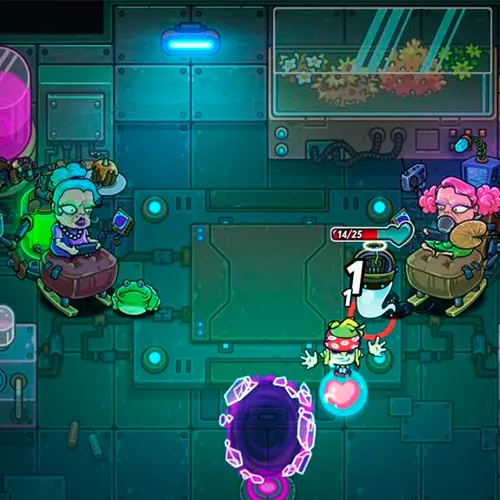
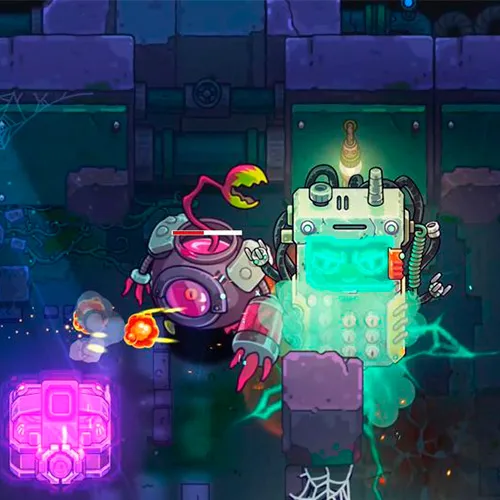
Metaverse Keeper è un gioco ricco di azione che accompagna i giocatori in un viaggio emozionante attraverso un mondo virtuale pieno di pericoli e avventure. Nei panni del giocatore, avrai il compito di esplorare il Metaverso e combattere orde di mostri e altre creature che minacciano di distruggere tutto ciò che incontrano sul loro cammino. Il gioco presenta una grafica mozzafiato e una trama coinvolgente che ti terrà incollato allo schermo per ore e ore.

Una delle caratteristiche distintive di Metaverse Keeper è la sua combinazione unica di RPG e gameplay in stile FPS. I giocatori possono scegliere tra una varietà di personaggi diversi, ognuno con le proprie abilità e capacità uniche, e impegnarsi in intensi combattimenti contro una vasta gamma di nemici. Il gioco presenta inoltre un solido sistema di creazione che permette ai giocatori di forgiare potenti armi e strumenti che li aiuteranno nel loro viaggio.

Un altro aspetto straordinario di Metaverse Keeper è la sua trama approfondita e la costruzione del mondo. Il gioco è ambientato in un mondo virtuale vivace e dettagliato, ricco di personaggi, luoghi e storie interessanti. Esplorando il Metaverso, scoprirai segreti nascosti e svelerai i misteri di questo mondo strano e affascinante. Nel complesso, Metaverse Keeper è un gioco imperdibile per chiunque ami l’azione, l’avventura e una narrazione coinvolgente.

Please follow the steps below to redeem your Steam key:

1) Download and install the Steam client on your PC: https://store.steampowered.com/about/
2) Open the Steam client, log in or create an account if you don't have one, and locate the Games tab on the top menu. Click this and then select "Activate a Product on Steam…"


3) Enter your code into the product activation field


Your game is now viewable in the "Library" tab and is available to download/install when you're ready.
Happy Gaming!

Nik 12/03/2022

I can't say enough good things about this website. The products are top-quality, the shipping is prompt, and the customer service team is always friendly and helpful.

Write a review

Note: HTML is not translated!
Captcha
Review Score: 5 / 5
Nik 12/03/2022

I can't say enough good things about this website. The products are top-quality, the shipping is prompt, and the customer service team is always friendly and helpful.

Support