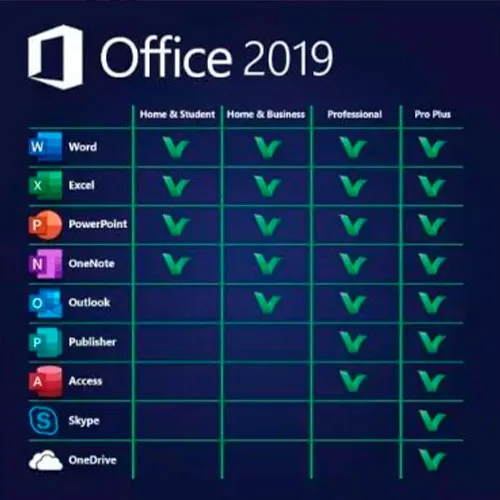
Office 2019 per Mac è compatibile con macOS Big Sur e versioni successive.
Funziona solo su MAC. Non può essere attivato in Giappone e Brasile.
NON FUNZIONA sulle versioni precedenti di MacOS
Microsoft Office 2019 Home and Business (Mac / Licenza associata all'account) (Licenza a vita / Global)
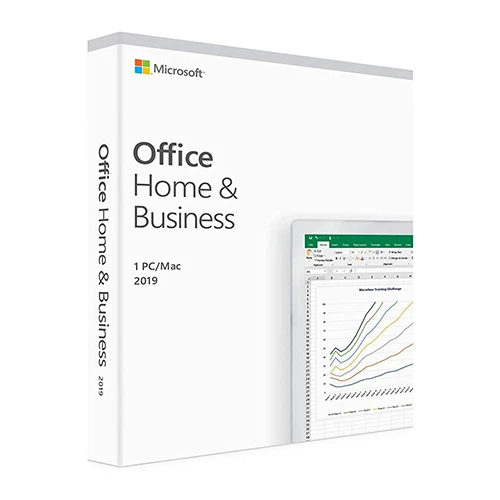


Microsoft Office 2019 Home and Business (Mac / Licenza associata all'account) (Licenza a vita / Global)

Rating

Recensioni
Prezzo
  • $16.66
cards klarna GPay Apple Pay affirm afterpay

Licenza ufficiale: Globale | Assistenza negli Stati Uniti 24 ore su 24, 7 giorni su 7 | Gamers Outlet - Chiavi CD

Piattaforma
Microsoft Lifetime License
Punti guadagnati
14
Availability
Esaurito
Assistenza
24/7 Assistenza
Consegna
Consegna digitale gratuita
La tua regione
Supportato
Opzioni disponibili per Office 2019 options

$16.66

Attivazione immediata: Microsoft Office 2019 Home and Business (Mac / Licenza associata all'account) (Licenza a vita / Globale) Chiave CD

Ottieni di più: Office 2019 è progettato per aiutarti a creare e organizzare più velocemente grazie a funzionalità che ti fanno risparmiare tempo, un nuovo look moderno e strumenti di collaborazione integrati. Inoltre, puoi salvare i tuoi documenti nel cloud su OneDrive e accedervi da qualsiasi luogo. 

Requisiti di sistema: Office 2019 Home e Business è disponibile nella versione a 64 bit. Compatibile con macOS Monterey 12 e versioni successive. 

Include: Word 2019, Excel 2019, PowerPoint 2019, OneNote 2019 e Outlook 2019

ISTRUZIONI PER L’ATTIVAZIONE

1 – Accedere al sito web ufficiale di attivazione https://setup.office.com/redeem/enter-key

2 – Riscatta il codice.

Offriamo anche le chiavi CD Windows 11 QUI
Windows 10 chiavi CD QUI
Office 2021 Chiavi CD QUI

  • Riceverò una fattura?
    La fattura verrà generata automaticamente al momento dell'ordine.

  • Dove posso trovare la mia fattura?
    Una volta completato l'ordine, la fattura sarà disponibile nella sezione "Il mio account" (in alto a destra nella barra superiore) -> "Cronologia ordini".

  • Posso modificare la mia fattura?
    Al momento non è possibile farlo autonomamente. Si prega di contattare il nostro supporto via e-mail all'indirizzo [email protected]; saremo lieti di aiutarvi. Per velocizzare la procedura, si prega di includere il numero d'ordine e qualsiasi altra informazione rilevante che si desidera visualizzare (come nome, codice fiscale/partita IVA, ecc.).

  • Posso installarlo su macOS?
    Sì, questo prodotto è compatibile con macOS (richiede Monterey o versione successiva).

  • Posso riscattare questo prodotto da qualche parte?
    Sì, questo prodotto è una versione globale.

  • Posso trasferire questo prodotto su un nuovo hardware?
    Sì, questa chiave può essere associata al tuo account Microsoft.

  • C'è una procedura specifica che devo seguire per installare questo prodotto?
    Si prega di leggere la scheda "Attivazione".

  • E se avessi bisogno di un'etichetta COA per quel prodotto?
    Su richiesta e con un costo aggiuntivo, è possibile scansionare e ricevere la stampa dell'etichetta del certificato di analisi (COA).

ACTIVATION INSTRUCTIONS

1 – Navigate to the official activation website https://setup.office.com/redeem/enter-key

2 – Redeem the code.

Notice:

At the end of the installation, a window may appear stating that an Office upgrade is required.
Please note that selecting this option will upgrade your installation to Office 365/2024, which will prevent you from fully activating Office 2016/2019.
If you attempt to log in after this upgrade,  Office will not be able to locate a valid license for your current installation.
This is due to recent updates, which require an Office 2021/2024 license or an active Office 365 subscription (version 16.90 and later).

To avoid this, skip any Office updates offered during the installation process.
Also, uncheck the option to "Automatically keep Microsoft apps up to date."
After that, simply click the red "X" at the top left of the window, log in with your Microsoft account, and complete the activation process.


bénédicte 26/05/2026

bonjour est ce que ça fonctionne pour IOS Ventura 13? merci +++

Juby Zacharias 24/05/2026

The quick support help me to solve an issue with the MacOS version on my Mac.
I am very satisfied with the this product. Very easy process to buy, activate and install. It all worked just fine.

Gus Vargas 20/09/2024

I am very satisfied with the purchase of this product. Very easy process to buy, activate and install. It all worked just fine. Gamers outlet is my number one choice. very reliable. Thanks a million.

Roberto 15/07/2024

All ok. The quick support help me to solve an issue with the MacOS version on my Mac, too old.

Utkarsh 20/03/2024

The redemption process was super easy, it takes you to the MyDrive website for redemption. I could download and install and get working within 5 minutes. So good experience.

Write a review

Note: HTML is not translated!
Captcha
Review Score: 5 / 5
bénédicte 26/05/2026

bonjour est ce que ça fonctionne pour IOS Ventura 13? merci +++

Juby Zacharias 24/05/2026

The quick support help me to solve an issue with the MacOS version on my Mac.
I am very satisfied with the this product. Very easy process to buy, activate and install. It all worked just fine.

Gus Vargas 20/09/2024

I am very satisfied with the purchase of this product. Very easy process to buy, activate and install. It all worked just fine. Gamers outlet is my number one choice. very reliable. Thanks a million.

Roberto 15/07/2024

All ok. The quick support help me to solve an issue with the MacOS version on my Mac, too old.

Utkarsh 20/03/2024

The redemption process was super easy, it takes you to the MyDrive website for redemption. I could download and install and get working within 5 minutes. So good experience.

Support