If you'd like to buy a big amount of copies, please contact [email protected]
You cannot link this license to a personal account or log into an account while using the software, as the license is tied exclusively to your system or device.
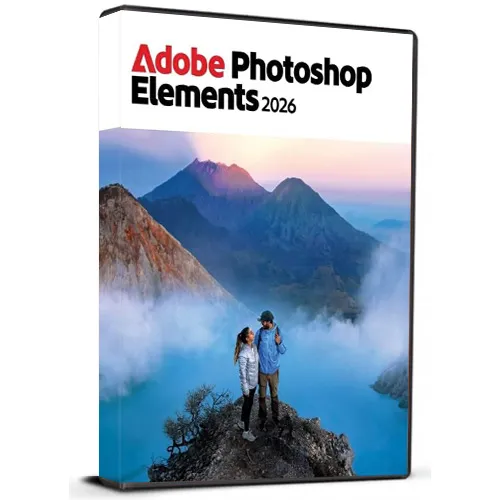
Adobe Photoshop Elements 2026 (Windows) (永久ライセンス - グローバル版)

Adobe Photoshop Elements 2026 (Windows) (永久ライセンス - グローバル版)

Rating

レビュー
価格
  • $51.91
cards klarna GPay Apple Pay affirm afterpay

公式ライセンス: グローバル | 24時間年中無休の米国サポート | Gamers Outlet - CD Keys

プラットフォーム
Adobe Lifetime License
獲得ポイント
30
在庫状況
在庫あり
サポート
24/7 サポート
配送
無料のデジタル配送
あなたの地域
対応済み

$51.91

即時配信: Adobe Photoshop Elements 2026 (Windows) (Lifetime License / グローバル) Game Key

Adobe Photoshop Elements 2026 for Windows を生涯ライセンスキー付きで入手し、初心者から上級者までを対象に設計された強力な写真編集ツールをお楽しみください。Photoshop Elements なら、直感的なインターフェースと高度な編集機能により、写真の補正、整理、レタッチ、そしてクリエイティブな加工を簡単に行うことができます。 この多言語版は複数の言語に対応しており、お好みの言語でソフトウェアをご利用いただけます。不要な被写体の削除、色の補正、印象的なエフェクトの作成、古い写真の修復、クリエイティブなプロジェクトのデザインなど、Photoshop Elementsは幅広い便利なツールを提供します。


製品の特長:

  • 永久ライセンスキー
  • Windows PC用
  • 多言語対応
  • 使いやすい写真編集ツール
  • クリエイティブなエフェクトと補正機能
  • 個人および業務用のプロジェクトに適しています
  • デジタル配信


ご購入後、ライセンスキーとダウンロード手順が届きます。これにより、ソフトウェアに簡単にアクセスできます。

注:本製品は Windows 向けに設計されており、互換性のあるシステムが必要です。

  • 請求書は発行されますか?
    ご注文完了時に自動的に請求書が発行されます。

  • 請求書はどこで確認できますか?
    注文が完了すると、「マイアカウント」(上部バーの右上)→「注文履歴」

    から請求書を確認できます。
  • 請求書を編集することはできますか?
    現在、お客様ご自身での編集はできません。 [email protected] までメールにてサポートまでご連絡ください。喜んでお手伝いさせていただきます。迅速な対応のため、注文番号および記載を希望される情報(お名前、ID/納税者番号など)をメールに記載してください。

  • macOSにインストールできますか?
    いいえ、本製品はmacOSに対応しておりません。

  • この製品はどこからでも利用できますか?
    はい、この製品はグローバル版です。

  • この製品を新しいハードウェアに移行することはできますか?
    いいえ、コードは1台のPCまたは1回のインストールにのみ有効です。アンインストールや再インストールを行う場合は、新しいコードを購入する必要がある場合があります。

  • この製品のインストールには特定の方法が必要ですか?
    詳細については、「アクティベーション」タブをご覧ください。

Please follow below mentioned steps:


1. Download the Software Download link: Download Adobe Photoshop 2026 ZIP

Please note: You need to download the ZIP folder first. After the download is complete, you must extract (unzip) the ZIP folder using WinRAR, 7-Zip, or the Windows default extractor.


2. Extract the ZIP Folder

Step 1: Locate the downloaded ZIP file on your windows computer.

Step 2: Right-click the ZIP file. 

Step 3: Choose Extract All... (Windows) or use WinRAR / 7-Zip and select an extraction option. 

Step 4: Wait until the extraction is finished. 

Step 5: Open the newly created extracted folder.


Important: Do not start the installation directly from inside the ZIP file. The software must be installed from the fully extracted folder. Starting the installer from the ZIP folder may cause the installation to fail or not work correctly.


3. Start the Installation

Step 1: Open the extracted folder.

Step 2: Locate the installation/setup file provided in the folder.

Step 3: Double-click the setup/installer and follow the on-screen installation instructions.

Step 4: Allow the installer to complete before launching the application.


4. You may refer to Video Installation Guide Link

If you prefer a visual walkthrough, use the video guide above and follow the same extraction and installation steps shown in this PDF.

✓ Download the ZIP folder

✓ Wait for the download to finish

✓ Extract the ZIP using Windows Extract All, WinRAR, or 7-Zip

✓ Open the extracted folder

✓ Start installation from the extracted folder

✗ Do NOT install directly from inside the ZIP folder

この製品にはレビューがありません。

レビューを書く

注: HTML は翻訳されません!
Captcha
Support