即時有効化: Microsoft Office 2016 Pro Plus (Phone Activation) (Lifetime License / グローバル) CD Key
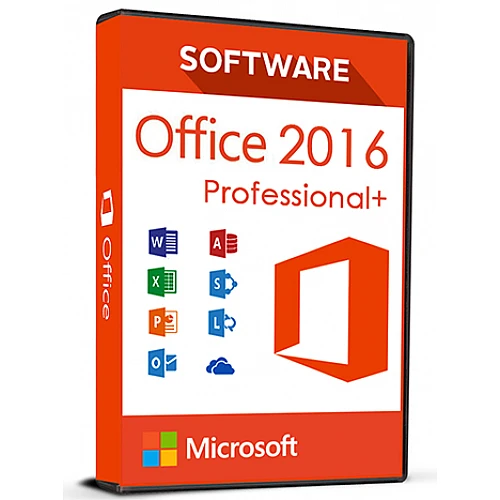
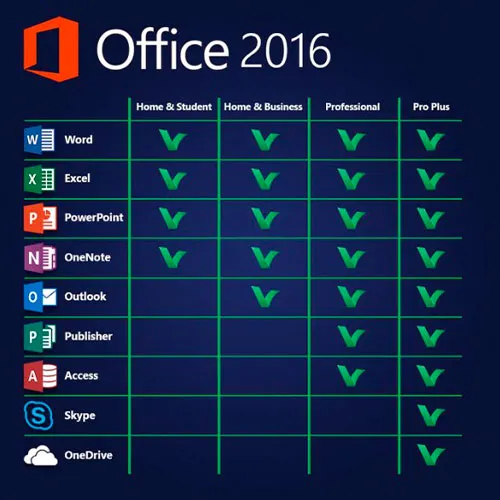
このバージョンのMS Office 2016には、Word、Excel、PowerPoint、OneNote、Outlook、Publisher、Skype for Business、Accessが含まれており、1台のPCで永続的に使用できます(1回のみ使用可能)。定型文書やデータベースの作成、図表の管理、プレゼンテーションのデザイン、メールの整理など、さまざまなことができます。
Microsoft Office Professional Plus 2016は、主に企業向けに設計されており、最高レベルの期待にも応えます。Word、Excel、PowerPoint、OneNote、Outlook、Publisher、Access、Skype for Businessといったプログラムを搭載したOffice Professional Plus 2016は、包括的なオフィスソフトウェアに求められるすべての要件を満たしています。定型文書の作成、図表の管理、プレゼンテーションのデザイン、データベースの作成、メールの整理など、Officeアプリケーションを使えば、仕事でもプライベートでも、あらゆるプロジェクトを短時間で完了できます。
アクティベーション手順:
1. こちらのリンクから公式インストーラーをダウンロードしてください:
こちら2. ソフトウェアをアクティベートするために、弊社からお送りしたプロダクトキーを入力してください。
3. 「電話でアクティベートする」オプションを選択します。
より詳しい手順については、ダウンロードセクションにアクセスし、「アクティベーション方法」ボタンをクリックしてください。
Windows 11のCDキーもこちらで提供しています。 
- 請求書は届きますか?
ご注文いただくと、請求書が自動的に作成されます。
- 請求書はどこで確認できますか?
注文が完了すると、請求書は「マイアカウント」(上部バーの右上隅)→「注文履歴」から確認できます。
- 請求書を編集できますか?
現在、お客様ご自身でこの操作を行うことはできません。[email protected]までメールにてサポートにお問い合わせください。喜んでお手伝いさせていただきます。より迅速な対応のため、ご注文番号と表示をご希望される関連情報(氏名、ID番号/納税者番号など)をメールにご記入ください。
- これをmacOSにインストールできますか?
いいえ、この製品はmacOSに対応していません。
- この商品はどこでも引き換えできますか?
はい、この製品はグローバル版です。
- この製品を新しいハードウェアに移行できますか?
いいえ、このコードは1台のPCまたは1回のインストールにのみ有効です。アンインストールまたは再インストールする場合は、新しいコードを購入する必要がある場合があります。
- この製品をインストールするにあたって、何か特別な手順が必要ですか?
「アクティベーション」タブをお読みください。
- その製品にCOAステッカーが必要な場合はどうすればいいですか?
ご要望に応じて、追加料金でCOAラベルの印刷物をスキャンして送信いたします。
ACTIVATION INSTRUCTIONS:
Download the official ISO/image to activate: https://officecdn.microsoft.com/pr/492350f6-3a01-4f97-b9c0-c7c6ddf67d60/media/en-US/ProPlusRetail.img
1-After installation, open Word (or any Office app)
When the Office Activation Wizard appears, select “Activate by phone.”
The wizard will display your Installation ID (IID) - you will need this shortly.
The IID is shown as 9 groups of 7 digits.
2-Go to the activation website
Open your browser and go to: https://aka.ms/aoh
3-Sign in
Choose Microsoft Account as the login method and sign in with your Microsoft account.
4-Select “Activate a Microsoft Product”
On the first page, click Activate a Microsoft Product.
5-Choose the product type
Select the category that matches what you are activating:
- Windows → for Windows activation
- Microsoft Office → for Office, Project, or Visio
- Windows Server, etc., if applicable
Note: For Project and Visio, choose Microsoft Office.
6-Select your operating system
7-Choose the product version
Select the version you are activating, for example:
- Office / Project / Visio 2024
- Office / Project / Visio 2021
- Office / Project / Visio 2019, etc.
8-Enter your Installation ID (IID)
You will see nine empty boxes.
Enter each group of digits from your IID into the matching box (9 groups of 7 digits).
When finished, submit the form to continue.
9-Answer the usage question
When asked, “How many computers have you installed this copy on?”
Type 0, then continue.
10-Receive your Confirmation ID
The website will display your Confirmation ID.
11-Enter the Confirmation ID into your PC
Return to the Office activation wizard and enter the Confirmation ID to finish activation.
Video Guide:









































 Lifetime License


