大量に購入したい場合は、[email protected] までご連絡ください。
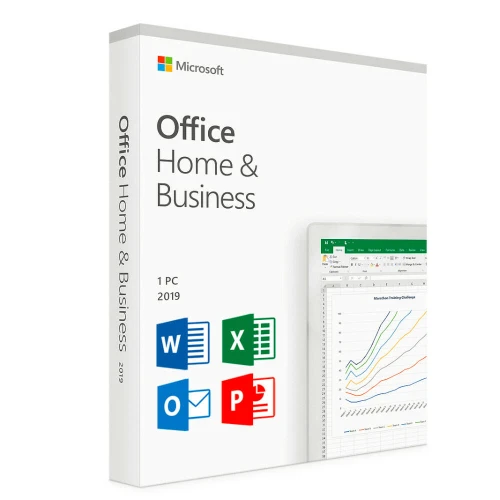
Office 2019 Home and Business Windows Phone Activation Cd Key Global

Office 2019 Home and Business Windows Phone Activation Cd Key Global

Rating

レビュー
価格
  • $5.05
cards klarna GPay Apple Pay affirm afterpay
プラットフォーム
Microsoft Windows Microsoft Office
獲得ポイント
4
在庫状況
在庫あり
サポート
24/7 サポート
配送
無料のデジタル配送
あなたの地域
対応済み
利用可能なオプション Office 2019 options

$5.05

注文時に請求書が自動的に生成されます

利用可能な言語: 多言語

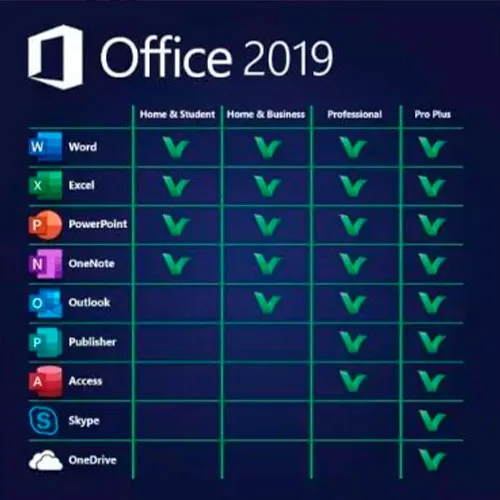
Word、Excel、PowerPoint、Outlook の 2021 バージョン。

Windows 10、Windows 11に対応

MacBook では動作しません。検索バーで「Home and Business」を検索してください。

コードは 1 台の PC / 1 回のインストールに有効です。Office をアンインストール/再インストールする場合は、新しいコードを購入する必要がある場合があります。

アクティベーション手順:

1. このリンクから公式インストーラーをダウンロードしてください: ここ
2. 弊社から受け取ったプロダクト キーを入力してソフトウェアをアクティブ化します。
3. 「電話で有効化」オプションを選択します。
4. アクティベーションガイドラインに記載されている電話番号に電話します。
5. 通話中に音声メッセージの指示に従います。

詳細な手順については、ダウンロード セクションにアクセスし、「アクティベート方法」ボタンをクリックしてください。

英語: https://officecdn.microsoft.com/db/492350F6-3A01-4F97-B9C0-C7C6DDF67D60/media/en-us/HomeBusiness2019Retail.img

スペイン語: https://officecdn.microsoft.com/db/492350F6-3A01-4F97-B9C0-C7C6DDF67D60/media/es-es/HomeBusiness2019Retail.img

ドイツ語: https://officecdn.microsoft.com/db/492350F6-3A01-4F97-B9C0-C7C6DDF67D60/media/de-de/HomeBusiness2019Retail.img

フランス語: https://officecdn.microsoft.com/db/492350F6-3A01-4F97-B9C0-C7C6DDF67D60/media/fr-fr/HomeBusiness2019Retail.img

イタリア語: https://officecdn.microsoft.com/db/492350F6-3A01-4F97-B9C0-C7C6DDF67D60/media/it-it/HomeBusiness2019Retail.img

オランダ語 (NL): https://officecdn.microsoft.com/db/492350F6-3A01-4F97-B9C0-C7C6DDF67D60/media/nl-nl/HomeBusiness2019Retail.img

他の言語の場合: https://gamersoutlet.zendesk.com/hc/en-us/articles/360058263113-Office-2019-pro-plus-activation-methods

Windows 11 CDキーもこちらで提供しています
Windows 10 CDキーはこちら
Office 2021 CDキーは
こちら

  • 請求書はもらえますか?
    注文すると請求書が自動的に生成されます。

  • 請求書はどこにありますか?
    注文が完了すると、請求書は「マイアカウント」(トップバーの右上隅)->「注文履歴」で確認できるようになります。

  • 請求書を編集できますか?
    現在、お客様ご自身で行うことはできません。[email protected] までメールでサポートにご連絡ください。喜んでお手伝いさせていただきます。処理を迅速に行うために、注文番号と、表示したい関連情報 (お名前、ID/納税者番号など) をご記入ください。

  • これをmacOSにインストールできますか?
    いいえ、この製品は macOS をサポートしておらず、Windows 10 および 11 のみと互換性があります。

  • この商品はどこでも引き換えられますか?
    はい、この製品はグローバルバージョンです。

  • この製品を新しいハードウェアに転送できますか?
    いいえ、コードは 1 台の PC または 1 回のインストールに有効です。アンインストールまたは再インストールする場合は、新しいコードを購入する必要がある場合があります。

  • この製品をインストールするには特別な方法が必要ですか?
    「アクティベーション」タブをお読みください。

  • その製品に COA ステッカーが必要な場合はどうすればいいですか?
    COA ラベルの印刷物は、ご要望に応じて追加料金でスキャンしてお送りすることもできます。

ACTIVATION INSTRUCTIONS:

Download the official ISO/image to activate: https://officecdn.microsoft.com/db/492350F6-3A01-4F97-B9C0-C7C6DDF67D60/media/en-us/HomeBusiness2019Retail.img

1-After installation, open Word (or any Office app)
When the Office Activation Wizard appears, select “Activate by phone.”
The wizard will display your Installation ID (IID) - you will need this shortly.
The IID is shown as 9 groups of 7 digits.

2-Go to the activation website
Open your browser and go to: https://aka.ms/aoh

3-Sign in
Choose Microsoft Account as the login method and sign in with your Microsoft account.

4-Select “Activate a Microsoft Product”
On the first page, click Activate a Microsoft Product.

5-Choose the product type
Select the category that matches what you are activating:

  • Windows → for Windows activation
  • Microsoft Office → for Office, Project, or Visio
  • Windows Server, etc., if applicable

Note: For Project and Visio, choose Microsoft Office.

6-Select your operating system

7-Choose the product version
Select the version you are activating, for example:

  • Office / Project / Visio 2024
  • Office / Project / Visio 2021
  • Office / Project / Visio 2019, etc. 

8-Enter your Installation ID (IID)
You will see nine empty boxes.
Enter each group of digits from your IID into the matching box (9 groups of 7 digits).
When finished, submit the form to continue.

9-Answer the usage question
When asked, “How many computers have you installed this copy on?”
Type 0, then continue.

10-Receive your Confirmation ID
The website will display your Confirmation ID.

11-Enter the Confirmation ID into your PC
Return to the Office activation wizard and enter the Confirmation ID to finish activation.


Video Guide:


Mike McGinness 02/06/2025

Fast and easy to install on Windows 11

JOSE CARLOS 05/03/2025

Merece nota máxima no atendimento. Parabéns!

JOSE CARLOS 05/03/2025

Estou muito feliz com a rapidez do atendimento. Merece a maior avaliação.

Federico Leonardi 08/11/2024

Attivazione okay, funzionante al 100%!

Andrei Andrei 17/04/2024

Wverything okay from long time ago ! thanks

レビューを書く

注: HTML は翻訳されません!
Captcha
Review Score: 5 / 5
Mike McGinness 02/06/2025

Fast and easy to install on Windows 11

JOSE CARLOS 05/03/2025

Merece nota máxima no atendimento. Parabéns!

JOSE CARLOS 05/03/2025

Estou muito feliz com a rapidez do atendimento. Merece a maior avaliação.

Federico Leonardi 08/11/2024

Attivazione okay, funzionante al 100%!

Andrei Andrei 17/04/2024

Wverything okay from long time ago ! thanks