大量にご購入をご希望の場合は、[email protected]までご連絡ください。
Microsoft Office 2016 Pro Plus Retail (Lifetime License / Global)

Microsoft Office 2016 Pro Plus Retail (Lifetime License / Global)
Rating

レビュー
価格
  • $10.35
cards klarna GPay Apple Pay affirm afterpay

公式ライセンス: グローバル | 24時間年中無休の米国サポート | Gamers Outlet - CD Keys

プラットフォーム
Microsoft Lifetime License
獲得ポイント
9
在庫状況
在庫あり
サポート
24/7 サポート
配送
無料のデジタル配送
あなたの地域
対応済み
利用可能なオプション Office 2016 options

$10.35

即時有効化: Microsoft Office 2016 Pro Plus Retail (Lifetime License / グローバル) CD Key

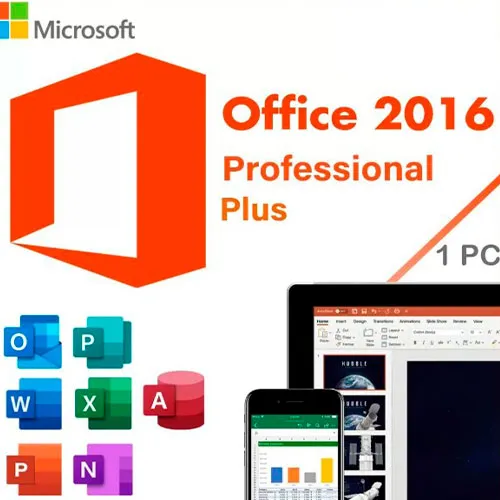
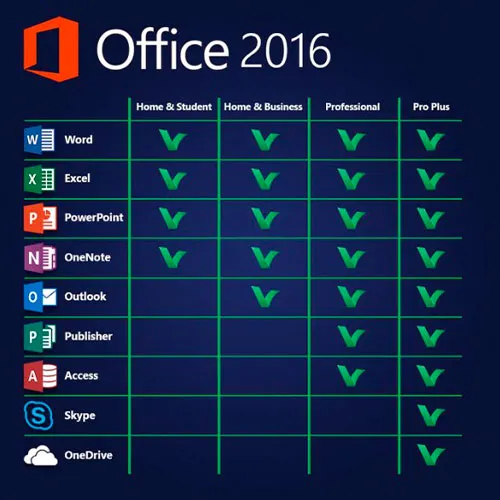
このバージョンのMS Office 2016には、Word、Excel、PowerPoint、OneNote、Outlook、Publisher、Skype for Business、Accessが含まれており、1台のPCで永続的に使用できます(1回のみ使用可能)。


定型文書やデータベースの作成、図表の管理、プレゼンテーションのデザイン、メールの整理など、さまざまなことができます!

Microsoft Office Professional Plus 2016は、主に企業向けに設計されており、最高レベルの期待にも応えます。Word、Excel、PowerPoint、OneNote、Outlook、Publisher、Access、Skype for Businessといったプログラムを搭載したOffice Professional Plus 2016は、包括的なオフィスソフトウェアに求められるすべての要件を満たしています。定型文書の作成、図表の管理、プレゼンテーションのデザイン、データベースの作成、メールの整理など、Officeアプリケーションを使えば、仕事でもプライベートでも、あらゆるプロジェクトを短時間で完了できます。

公式ISOイメージをダウンロードして、プロダクトキーをアクティベートするには、 こちらをクリックしてください。

Windows 11のCDキーもこちらで提供しています
Windows 10のCDキーはこちら
Office 2021のCDキーはこちら

  • 請求書は届きますか?
    ご注文いただくと、請求書が自動的に作成されます。

  • 請求書はどこで確認できますか?
    注文が完了すると、請求書は「マイアカウント」(上部バーの右上隅)→「注文履歴」から確認できます。

  • 請求書を編集できますか?
    現在、お客様ご自身でこの操作を行うことはできません。[email protected]までメールにてサポートにお問い合わせください。喜んでお手伝いさせていただきます。より迅速な対応のため、ご注文番号と表示をご希望される関連情報(氏名、身分証明書番号/納税者番号など)をメールにご記入ください。

  • これをmacOSにインストールできますか?
    いいえ、この製品はmacOSに対応していません。

  • この商品はどこでも引き換えできますか?
    はい、この製品はグローバル版です。

  • この製品を新しいハードウェアに移行できますか?
    いいえ、このコードは1台のPCまたは1回のインストールにのみ有効です。アンインストールまたは再インストールする場合は、新しいコードを購入する必要がある場合があります。

  • この製品をインストールするにあたって、何か特別な手順が必要ですか?
    「アクティベーション」タブをお読みください。

  • その製品にCOAステッカーが必要な場合はどうすればいいですか?
    ご要望に応じて、追加料金でCOAラベルの印刷物をスキャンしてお送りすることも可能です。

Office 2016 Retail requires the official installer:

https://officecdn.microsoft.com/pr/492350f6-3a01-4f97-b9c0-c7c6ddf67d60/media/en-US/ProPlusRetail.img

After launching the application, you'll be prompted to use the code provided by us.


johana monsalve 23/05/2026

me da probelma
la activacion esta clave es para una version diferente de m office profesional plus 2016 de la que esta instalada
en la descarga del enlace pro plus retail del enlace vuestro no se termina de istalar
tengo que montarlo en un cd
o como debo de ejecutarlo

jimmy s 22/04/2026

Legit Keys! Thanks A Lot!

DhimitriTOPG 22/01/2026

It works! The only Verification Code that works!!!!

Mar co 06/04/2024

bought key, installed Office, works like a charm

Peeter 03/01/2024

I spent about 4 hours to activate the program, but thanks to the INCREDIBLY fast response of support, it was finally fixed.
So, if something doesn't work, feel free to contact support and you will be helped immediately!
One small note about installation.
If you just click the Setup.exe file in the ISO folder, it will automatically install the 32bit version for you without asking anything. On the second attempt, I went into the folder "Office" and ran Setup64.exe to get the right version installed.
MSOffice 2016 installed on Windows 11.

レビューを書く

注: HTML は翻訳されません!
Captcha
Review Score: 5 / 5
johana monsalve 23/05/2026

me da probelma
la activacion esta clave es para una version diferente de m office profesional plus 2016 de la que esta instalada
en la descarga del enlace pro plus retail del enlace vuestro no se termina de istalar
tengo que montarlo en un cd
o como debo de ejecutarlo

jimmy s 22/04/2026

Legit Keys! Thanks A Lot!

DhimitriTOPG 22/01/2026

It works! The only Verification Code that works!!!!

Mar co 06/04/2024

bought key, installed Office, works like a charm

Peeter 03/01/2024

I spent about 4 hours to activate the program, but thanks to the INCREDIBLY fast response of support, it was finally fixed.
So, if something doesn't work, feel free to contact support and you will be helped immediately!
One small note about installation.
If you just click the Setup.exe file in the ISO folder, it will automatically install the 32bit version for you without asking anything. On the second attempt, I went into the folder "Office" and ran Setup64.exe to get the right version installed.
MSOffice 2016 installed on Windows 11.

Support