Ativação Instantânea: Microsoft Office 2019 Pro Plus (Phone Activation) (Lifetime License / Global) CD Key
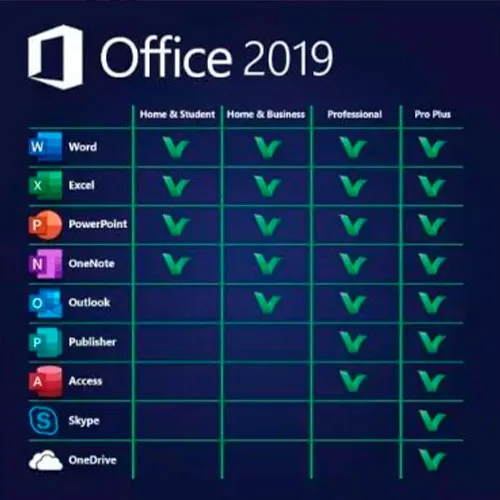
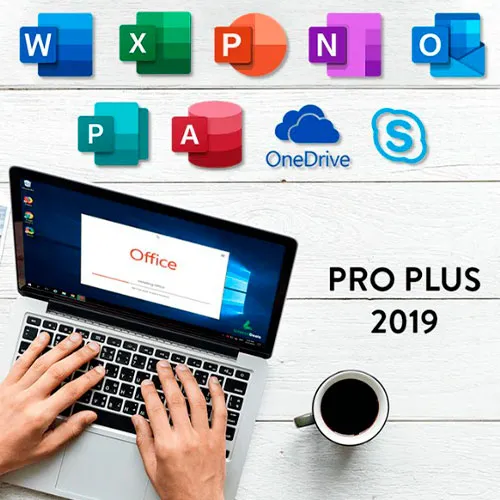
O Microsoft Office 2019 Professional Plus inclui as versões clássicas de 2019 do Word, Excel, PowerPoint, OneNote, Outlook, Access, Publisher e Skype for Business.
O Office 2019 Professional Plus é uma ferramenta poderosa que nos serve como usuários quase diariamente. Para trabalho, estudo, anotações e e-mails. O Office 2019 Professional Plus oferece um novo design e novos recursos que tornarão nossa vida ainda mais fácil! Aproveite e garanta já sua cópia pelo menor preço do mercado. Estoque garantido com suporte 24 horas por dia, 7 dias por semana.
INSTRUÇÕES DE ATIVAÇÃO:
1. Baixe o instalador oficial neste link:
Aqui 2. Insira a chave do produto que você recebeu para ativar o software.
3. Selecione a opção "Ativar por telefone".
Para obter instruções mais detalhadas, visite a seção de downloads e clique no botão "Como ativar".
Também oferecemos chaves de CD do Windows 11 AQUI. Chaves de CD do Windows 10 AQUI Chaves de CD do Office 2021 AQUI 
- Vou receber uma fatura?
A fatura será gerada automaticamente após a realização do pedido.
- Onde posso encontrar minha fatura?
Após a conclusão do pedido, a fatura estará disponível em "Minha conta" (canto superior direito da barra superior) -> "Histórico de pedidos".
- Posso editar minha fatura?
Atualmente, você não pode fazer isso sozinho. Entre em contato com nosso suporte por e-mail, no endereço [email protected], e teremos prazer em ajudá-lo. Para agilizar o processo, inclua o número do pedido e quaisquer informações relevantes que você queira que sejam exibidas (como seu nome, número de identificação fiscal, etc.).
- Posso instalar isso no macOS?
Não, este produto não é compatível com MacOS.
- Posso resgatar este produto em qualquer lugar?
Sim, este produto é uma versão global.
- Posso transferir este produto para um novo hardware?
Não, o código é válido para 1 computador ou 1 instalação. Se você desinstalar ou reinstalar o programa, poderá precisar comprar um novo código.
- Existe alguma maneira específica de instalar este produto?
Por favor, leia a aba 'Ativação'.
- E se eu precisar de um adesivo de certificado de autenticidade (COA) para esse produto?
A impressão da etiqueta do Certificado de Autenticidade (COA) pode ser digitalizada e enviada a você mediante solicitação, por uma taxa adicional.
ACTIVATION INSTRUCTIONS:
Download the official ISO/image to activate: https://officecdn.microsoft.com/pr/492350f6-3a01-4f97-b9c0-c7c6ddf67d60/media/en-US/ProPlus2019Retail.img
1-After installation, open Word (or any Office app)
When the Office Activation Wizard appears, select “Activate by phone.”
The wizard will display your Installation ID (IID) - you will need this shortly.
The IID is shown as 9 groups of 7 digits.
2-Go to the activation website
Open your browser and go to: https://aka.ms/aoh
3-Sign in
Choose Microsoft Account as the login method and sign in with your Microsoft account.
4-Select “Activate a Microsoft Product”
On the first page, click Activate a Microsoft Product.
5-Choose the product type
Select the category that matches what you are activating:
- Windows → for Windows activation
- Microsoft Office → for Office, Project, or Visio
- Windows Server, etc., if applicable
Note: For Project and Visio, choose Microsoft Office.
6-Select your operating system
7-Choose the product version
Select the version you are activating, for example:
- Office / Project / Visio 2024
- Office / Project / Visio 2021
- Office / Project / Visio 2019, etc.
8-Enter your Installation ID (IID)
You will see nine empty boxes.
Enter each group of digits from your IID into the matching box (9 groups of 7 digits).
When finished, submit the form to continue.
9-Answer the usage question
When asked, “How many computers have you installed this copy on?”
Type 0, then continue.
10-Receive your Confirmation ID
The website will display your Confirmation ID.
11-Enter the Confirmation ID into your PC
Return to the Office activation wizard and enter the Confirmation ID to finish activation.
For other Office languages, scroll down here: https://gamersoutlet.zendesk.com/hc/en-us/articles/360058263113-Office-2019-pro-plus-activation-methods
Video Guide:









































 Lifetime License


