




























If you'd like to buy a big amount of copies, please contact [email protected]
You cannot link this license to a personal account or log into an account while using the software, as the license is tied exclusively to your system or device.
Adobe Photoshop Elements 2026 (Windows) (Levenslange licentie – Global)
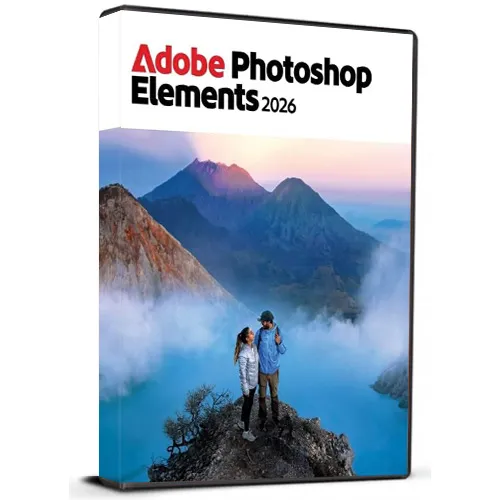

Adobe Photoshop Elements 2026 (Windows) (Levenslange licentie – Global)

Waardering:

Beoordelingen
Prijs
  • $51.91
cards klarna GPay Apple Pay affirm afterpay

Officiële Licentie: Wereldwijd | 24/7 Amerikaanse Ondersteuning | Gamers Outlet - CD Keys

Platform
Adobe Lifetime License
Verdiende punten
30
Beschikbaarheid
Op voorraad
Ondersteuning
24/7 Ondersteuning
Levering
Gratis digitale levering
Uw regio
Ondersteund

$51.91

Directe Levering: Adobe Photoshop Elements 2026 (Windows) (Lifetime License / Wereldwijd) Game Key

Koop Adobe Photoshop Elements 2026 voor Windows met een Licentiesleutel voor onbeperkte gebruiksduur en profiteer van krachtige fotobewerkingstools die zijn ontworpen voor zowel beginners als ervaren gebruikers. Met Photoshop Elements kunt u uw foto’s eenvoudig verbeteren, ordenen, retoucheren en creatief bewerken dankzij een intuïtieve interface en intelligente bewerkingsfuncties. Deze meertalige versie ondersteunt meerdere talen, zodat u de software in de taal van uw voorkeur kunt gebruiken. Of u nu ongewenste objecten wilt verwijderen, kleuren wilt verbeteren, indrukwekkende effecten wilt creëren, oude foto's wilt restaureren of creatieve projecten wilt ontwerpen: Photoshop Elements biedt een breed scala aan handige tools.


Productkenmerken:

  • Licentiesleutel voor onbeperkte gebruiksduur
  • Voor Windows PC
  • Meertalige ondersteuning
  • Gebruiksvriendelijke fotobewerkingstools
  • Creatieve effecten en verbeteringen
  • Geschikt voor persoonlijke en professionele projecten
  • Digitale levering


Na aankoop ontvangt u uw licentiesleutel en instructies voor het downloaden van de software voor gemakkelijke toegang tot de software.

Opmerking: Dit product is bedoeld voor Windows en vereist een compatibel systeem.

  • Krijg ik een factuur?
    De factuur wordt automatisch aangemaakt zodra u een bestelling plaatst.

  • Waar kan ik mijn factuur vinden?
    Zodra de bestelling is afgerond, is de factuur te vinden onder 'Mijn account' (rechtsboven in de bovenste balk) -> 'Bestelgeschiedenis'.

  • Kan ik mijn factuur aanpassen?
    Momenteel kunt u dit niet zelf doen. Neem per e-mail contact op met onze klantenservice via [email protected], dan helpen we je graag verder. Om het proces te versnellen, verzoeken we je het bestelnummer en alle relevante informatie die je op de factuur wilt zien (zoals je naam, ID-nummer/belastingnummer, enz.) te vermelden.

  • Kan ik dit op macOS installeren?
    Nee, dit product ondersteunt macOS niet.

  • Kan ik dit product overal activeren?
    Ja, dit product is een Global versie.

  • Kan ik dit product overzetten naar nieuwe hardware?
    Nee, de code is geldig voor 1 PC of 1 installatie – als u het product verwijdert of opnieuw installeert, moet u mogelijk een nieuwe code aanschaffen.

  • Moet ik dit product op een specifieke manier installeren?
    Lees voor meer informatie het tabblad ‘Activering’.

Please follow below mentioned steps:


1. Download the Software Download link: Download Adobe Photoshop 2026 ZIP

Please note: You need to download the ZIP folder first. After the download is complete, you must extract (unzip) the ZIP folder using WinRAR, 7-Zip, or the Windows default extractor.


2. Extract the ZIP Folder

Step 1: Locate the downloaded ZIP file on your windows computer.

Step 2: Right-click the ZIP file. 

Step 3: Choose Extract All... (Windows) or use WinRAR / 7-Zip and select an extraction option. 

Step 4: Wait until the extraction is finished. 

Step 5: Open the newly created extracted folder.


Important: Do not start the installation directly from inside the ZIP file. The software must be installed from the fully extracted folder. Starting the installer from the ZIP folder may cause the installation to fail or not work correctly.


3. Start the Installation

Step 1: Open the extracted folder.

Step 2: Locate the installation/setup file provided in the folder.

Step 3: Double-click the setup/installer and follow the on-screen installation instructions.

Step 4: Allow the installer to complete before launching the application.


4. You may refer to Video Installation Guide Link

If you prefer a visual walkthrough, use the video guide above and follow the same extraction and installation steps shown in this PDF.

✓ Download the ZIP folder

✓ Wait for the download to finish

✓ Extract the ZIP using Windows Extract All, WinRAR, or 7-Zip

✓ Open the extracted folder

✓ Start installation from the extracted folder

✗ Do NOT install directly from inside the ZIP folder

Er zijn geen beoordelingen voor dit product.

Geef beoordeling

Note: HTML-code wordt niet vertaald!
Captcha
Support


