Directe activering: Microsoft Visual Studio 2019 Professional (levenslange licentie / Wereldwijd) CD-sleutel
Microsoft Visual Studio 2019 Professional is een veelomvattend
softwareontwikkelingsplatform dat een breed scala aan tools en functies biedt
voor ontwikkelaars. Met Visual Studio 2019 Professional kunt u applicaties maken en debuggen
voor Windows, Linux, macOS, Android en iOS, evenals web- en
cloudapplicaties.
Enkele belangrijke functies van Visual Studio 2019 Professional
zijn onder meer:
IntelliSense:
Deze functie biedt intelligente codeaanvulling, parameterinformatie en
snelle informatie voor C#, Visual Basic en C++, evenals Python en
TypeScript.
Foutopsporing
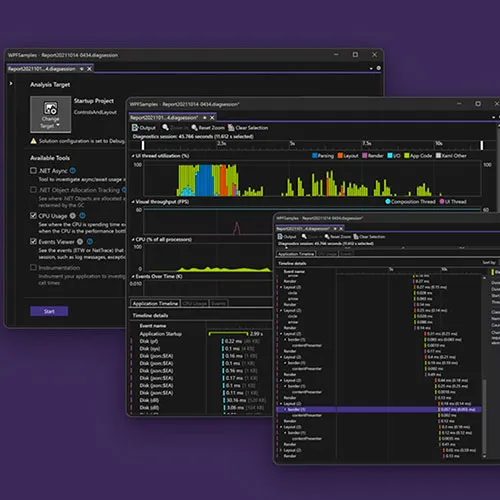
en diagnostiek: Visual Studio 2019 Professional bevat geavanceerde
foutopsporings- en diagnostische tools waarmee u problemen in uw code kunt identificeren en oplossen.
Codenavigatie:
Met de codenavigatietools in Visual Studio 2019 Professional
kunt u eenvoudig door uw code navigeren, definities vinden en
naar verwijzingen gaan.
Code-
refactoring: Visual Studio 2019 Professional bevat een reeks tools voor code-
refactoring waarmee u de kwaliteit en onderhoudbaarheid van
uw code kunt verbeteren.
Ga voor meer informatie over Visual Studio 2019 Professional en om een licentie aan te schaffen naar onze website op https://www.gamers-outlet.net.
We bieden ook een breed scala aan andere softwareproducten, waaronder besturingssystemen,
productiviteitstools en beveiligingssoftware. Ons team helpt u graag
met al uw vragen over onze producten en diensten.
ACTIVERINGSINSTRUCTIES:
Downloaden en activeer via het officiële installatieprogramma:
Ga naar: https://visualstudio.microsoft.com/vs/older-downloads/ en klik op "Visual Studio 2019 downloaden"
Log in met uw account
Ga vervolgens naar "downloads" en download het product vanaf daar
Zodra u het programma hebt gedownload en gestart, gaat u naar "Help" en klikt u op "Product registreren"
Klik op "Ontgrendelen met Productsleutel" en voer de verstrekte sleutel in.

- Krijg ik een factuur?
De factuur wordt automatisch gegenereerd zodra u een bestelling plaatst.
- Waar kan ik mijn factuur vinden?
Zodra de bestelling is afgerond, is de factuur beschikbaar onder 'Mijn account' (rechtsboven in de menubalk) -> 'Bestelgeschiedenis'.
- Kan ik mijn factuur wijzigen?
Momenteel kunt u dit niet zelf doen. Neem contact op met onze klantenservice via e-mail op [email protected], dan helpen we u graag verder. Vermeld voor een snellere afhandeling het ordernummer en alle relevante informatie die u wilt laten zien (zoals uw naam, ID-/btw-nummer, enz.).
- Kan ik dit op macOS installeren?
Nee, dit product is niet compatibel met MacOS.
- Kan ik dit product ergens inwisselen?
Ja, dit product is een wereldwijde versie.
- Kan ik dit product overzetten naar nieuwe hardware?
Nee, de code is geldig voor 1 pc of 1 installatie. Als u de software verwijdert of opnieuw installeert, moet u mogelijk een nieuwe code kopen.
- Is er een specifieke manier waarop ik dit product moet installeren?
Lees het tabblad 'Activering'.
- Wat als ik een COA-sticker nodig heb voor dat product?
De afdruk van het COA-label kan op verzoek worden gescand en naar u worden verzonden, tegen een extra vergoeding.
Download the Visual Studio 2019 Package:
Visual Studio 2019 Download HERE
Steps to install Visual Studio 2019:
- Double-click the downloaded file to run the installer.
- Open the Visual Studio Installer and click "Continue" to agree to the Microsoft Software License Terms. (Image 1)
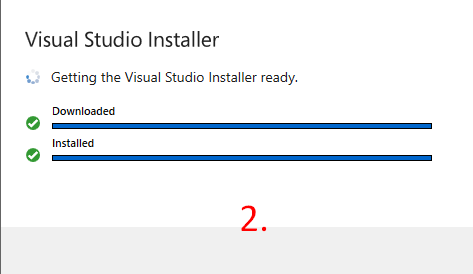
- Wait for the Visual Studio Installer to get ready. This involves downloading and installing necessary files. (Image 2)
- Select your preferred installation locations for the Visual Studio IDE and other components. (Image 3)
- Click "Install" to begin the installation process.
Wait for the installation to complete and then launch Visual Studio from the Start menu or desktop.
Activating Visual Studio:
- Open Visual Studio.
- Click on "Help" in the top menu.
- Select "Register Visual Studio."
- Enter your product key to unlock.













































 Lifetime License


