Als u een groot aantal exemplaren wilt kopen, neem dan contact op met [email protected]
Office 2019 Professional Plus Cd Key Phone Activation

Office 2019 Professional Plus Cd Key Phone Activation

Waardering:

Beoordelingen
Prijs
  • $3.47
cards klarna GPay Apple Pay affirm afterpay
Platform
Microsoft Windows Microsoft Office
Verdiende punten
2
Beschikbaarheid
Op voorraad
Ondersteuning
24/7 Ondersteuning
Levering
Gratis digitale levering
Uw regio
Ondersteund
Beschikbare opties voor Office 2019 options

$3.47

factuur wordt automatisch gegenereerd bij het plaatsen van een bestelling

Beschikbare talen: MEERTALIG

ACTIVERINGSINSTRUCTIES:

1. Download het officiële installatieprogramma via deze link: Hier
2. Voer de productsleutel in die u van ons hebt ontvangen om de software te activeren.
3. Selecteer de optie 'Activeren via telefoon'.
4. Bel het telefoonnummer dat in de activeringsrichtlijnen staat.
5. Volg de instructies in het spraakbericht tijdens het gesprek.

Voor meer gedetailleerde instructies kunt u terecht in de downloadsectie en op de knop 'Activeren' klikken.

Werkt niet op MacBook ! Zoek naar Home en Business @ zoekbalk.

De code is geldig voor 1 pc/1 installatie. Als u de installatie ongedaan maakt/opnieuw installeert, moet u mogelijk een nieuwe code kopen.

Werkt niet op Android/ChromeOS/iOS Apple-apparaten. Alleen compatibel met Windows 10, Windows 11.

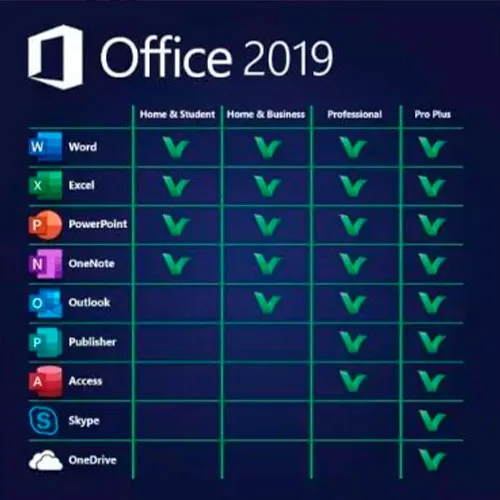
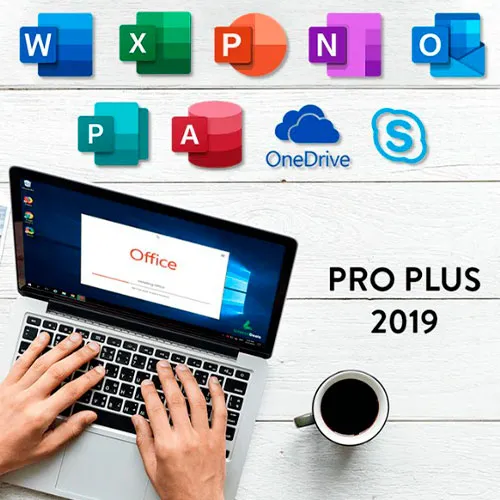
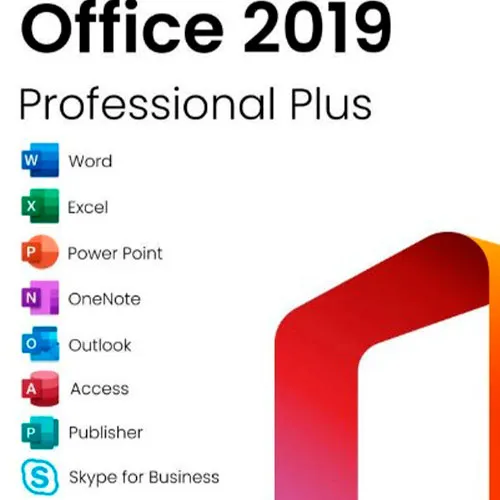
Microsoft Office 2019 Professional Plus bevat de klassieke 2019-versies van Word, Excel, PowerPoint, OneNote, Outlook, Access, Publisher en Skype voor Bedrijven.

Office 2019 professional plus is een krachtige tool die ons als eindgebruikers bijna dagelijks van dienst is. Voor werk, als student, voor notities en voor e-mailen. Office 2019 pro plus biedt een nieuw ontwerp en nieuwe functies die ons leven nog gemakkelijker maken! Wees er snel bij en koop uw eigen exemplaar voor de goedkoopste prijs. Gegarandeerde voorraad met 24/7 ondersteuning.

Wij bieden ook Windows 11 cd-sleutels HIER aan
Windows 10 cd-sleutels HIER
Office 2021 cd-sleutels
HIER

  • Krijg ik een factuur?
    De factuur wordt automatisch gegenereerd wanneer u een bestelling plaatst.

  • Waar kan ik mijn factuur vinden?
    Zodra de bestelling is voltooid, is de factuur beschikbaar onder 'Mijn account' (rechtsboven in de bovenste balk) -> 'Bestelgeschiedenis'.

  • Kan ik mijn factuur bewerken?
    Momenteel kunt u dit niet zelf doen. Neem contact op met onze support via e-mail op [email protected], en we helpen u graag verder. Voor een sneller proces, vermeldt u het ordernummer en alle relevante informatie die u wilt laten zien (zoals uw naam, ID/belastingnummer, etc.).

  • Kan ik dit op macOS installeren?
    Nee, dit product ondersteunt MacOS niet.

  • Kan ik dit product overal inwisselen?
    Ja, dit product is een wereldwijde versie.

  • Kan ik dit product overzetten naar nieuwe hardware?
    Nee, de code is geldig voor 1 pc of 1 installatie. Als u de app verwijdert of opnieuw installeert, moet u mogelijk een nieuwe code kopen.

  • Is er een specifieke manier om dit product te installeren?
    Lees het tabblad 'Activering'.

  • Wat als ik een COA-sticker voor dat product nodig heb?
    Op verzoek kunnen wij tegen een meerprijs het COA-label scannen en naar u opsturen.

ACTIVATION INSTRUCTIONS:

Download the official ISO/image to activate: https://officecdn.microsoft.com/pr/492350f6-3a01-4f97-b9c0-c7c6ddf67d60/media/en-US/ProPlus2019Retail.img

1-After installation, open Word (or any Office app)
When the Office Activation Wizard appears, select “Activate by phone.”
The wizard will display your Installation ID (IID) - you will need this shortly.
The IID is shown as 9 groups of 7 digits.

2-Go to the activation website
Open your browser and go to: https://aka.ms/aoh

3-Sign in
Choose Microsoft Account as the login method and sign in with your Microsoft account.

4-Select “Activate a Microsoft Product”
On the first page, click Activate a Microsoft Product.

5-Choose the product type
Select the category that matches what you are activating:

  • Windows → for Windows activation
  • Microsoft Office → for Office, Project, or Visio
  • Windows Server, etc., if applicable

Note: For Project and Visio, choose Microsoft Office.

6-Select your operating system

7-Choose the product version
Select the version you are activating, for example:

  • Office / Project / Visio 2024
  • Office / Project / Visio 2021
  • Office / Project / Visio 2019, etc. 

8-Enter your Installation ID (IID)
You will see nine empty boxes.
Enter each group of digits from your IID into the matching box (9 groups of 7 digits).
When finished, submit the form to continue.

9-Answer the usage question
When asked, “How many computers have you installed this copy on?”
Type 0, then continue.

10-Receive your Confirmation ID
The website will display your Confirmation ID.

11-Enter the Confirmation ID into your PC
Return to the Office activation wizard and enter the Confirmation ID to finish activation.


For other Office languages, scroll down here: https://gamersoutlet.zendesk.com/hc/en-us/articles/360058263113-Office-2019-pro-plus-activation-methods 

Video Guide:


Niko 25-10-2025

At first attempt I failed to activate, but at second call it was super!

VT1 29-09-2025

product was activated. good!

Hasinul AREFIN 15-09-2025

This is amazing. I am really impressed with this service. Have not faced any issue to install the MS Office.

Sandor Zakarias 05-08-2025

I was dubious, but its legit,!!! Australian Toll Free number is the one that works for Australia, goes through to the official Microsoft Activation Center...A n AI operator texts you a link to your mobile, which then sends you to the activation website specifically for you...(only works once , you have to ring again if you buy 2 which I eneded up doing) Type in the long string of numbers that come up on your computer after instalation and opening Word (And typing in the initial code given to you after the $6.15 purchase. and selecting Phone activation)
And then another code is generated that you type into your Word activation screen on your computer
Its alot of typing in numbers, but worth the effort for AU 6 bucks !! Enjoy

Kevin Oswaldo Magaña Pech 15-07-2025

Good, work, in from mexico

Geef beoordeling

Note: HTML-code wordt niet vertaald!
Captcha
Review Score: 5 / 5
Niko 25-10-2025

At first attempt I failed to activate, but at second call it was super!

VT1 29-09-2025

product was activated. good!

Hasinul AREFIN 15-09-2025

This is amazing. I am really impressed with this service. Have not faced any issue to install the MS Office.

Sandor Zakarias 05-08-2025

I was dubious, but its legit,!!! Australian Toll Free number is the one that works for Australia, goes through to the official Microsoft Activation Center...A n AI operator texts you a link to your mobile, which then sends you to the activation website specifically for you...(only works once , you have to ring again if you buy 2 which I eneded up doing) Type in the long string of numbers that come up on your computer after instalation and opening Word (And typing in the initial code given to you after the $6.15 purchase. and selecting Phone activation)
And then another code is generated that you type into your Word activation screen on your computer
Its alot of typing in numbers, but worth the effort for AU 6 bucks !! Enjoy

Kevin Oswaldo Magaña Pech 15-07-2025

Good, work, in from mexico