Office 2019 pour Mac est compatible avec macOS Big Sur et les versions ultérieures.
Il fonctionne uniquement sur Mac. Il ne peut pas être activé au Japon ni au Brésil.
NE FONCTIONNE PAS SUR LES ANCIENNES VERSIONS DE MACOS
Microsoft Office 2019 Famille et Entreprise (Mac / Licence liée à un compte) (Licence à vie / Global)
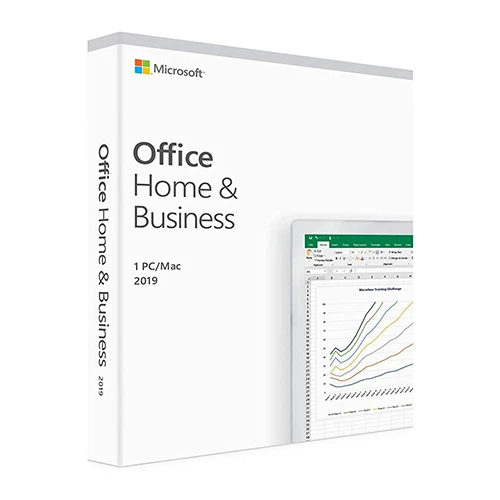


Microsoft Office 2019 Famille et Entreprise (Mac / Licence liée à un compte) (Licence à vie / Global)

Évaluation

Prix
  • $16.66
cards klarna GPay Apple Pay affirm afterpay

Licence officielle : Mondial | Assistance aux États-Unis 24 h/24, 7 j/7 | Gamers Outlet - Clés CD

Plate-forme
Microsoft Lifetime License
Points gagnés
14
Disponibilité
Rupture de stock
Assistance
24/7 Assistance
Livraison
Livraison numérique gratuite
Votre région
Pris en charge
Options disponibles pour Office 2019 options

$16.66

Activation immédiate : Microsoft Office 2019 Famille et Entreprise (Mac / Licence liée au compte) (Licence à vie / Mondial) Clé CD

Soyez plus productif : Office 2019 est conçu pour vous aider à créer et à organiser plus rapidement grâce à des fonctionnalités qui vous font gagner du temps, une nouvelle interface moderne et des outils de collaboration intégrés. De plus, vous pouvez enregistrer vos documents dans le cloud sur OneDrive et y accéder où que vous soyez. 

Configuration requise : Office 2019 pour particuliers et entreprises est disponible en version 64 bits. Compatible avec macOS Monterey 12 et versions ultérieures. 

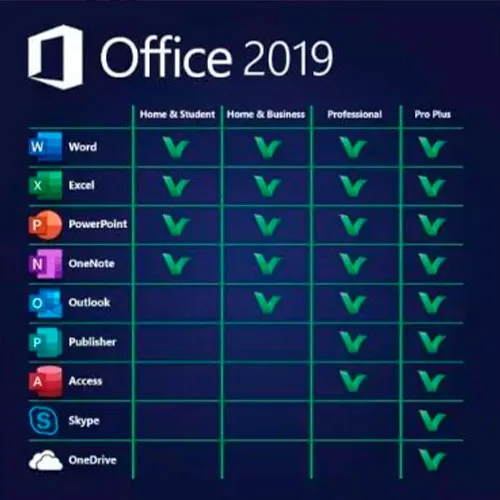
Comprend : Word 2019, Excel 2019, PowerPoint 2019, OneNote 2019 et Outlook 2019

INSTRUCTIONS D’ACTIVATION

1 – Rendez-vous sur le site officiel d’activation https://setup.office.com/redeem/enter-key

2 – Saisissez le code.

Nous proposons également des clés CD Windows 11 ICI
Windows 10 clés CD ICI
Office 2021 Clés CD ICI

  • Vais-je recevoir une facture ?
    La facture sera générée automatiquement lors de la passation de la commande.

  • Où puis-je trouver ma facture ?
    Une fois la commande finalisée, la facture sera disponible dans la section « Mon compte » (en haut à droite de la barre supérieure) -> « Historique des commandes ».

  • Puis-je modifier ma facture ?
    Actuellement, vous ne pouvez pas effectuer cette opération vous-même. Veuillez contacter notre service client par e-mail à l'adresse [email protected] ; nous serons ravis de vous aider. Pour un traitement plus rapide, veuillez indiquer votre numéro de commande ainsi que toute information pertinente que vous souhaitez nous communiquer (nom, numéro d'identification fiscale, etc.).

  • Puis-je installer ceci sur macOS ?
    Oui, ce produit est compatible avec MacOS (nécessite Monterey ou une version supérieure).

  • Puis-je utiliser ce produit n'importe où ?
    Oui, ce produit est une version internationale.

  • Puis-je transférer ce produit sur un nouveau matériel ?
    Oui, cette clé peut être associée à votre compte Microsoft.

  • Existe-t-il une méthode spécifique pour installer ce produit ?
    Veuillez lire l'onglet « Activation ».

  • Que se passe-t-il si j'ai besoin d'un certificat d'authenticité pour ce produit ?
    L'étiquette du certificat d'analyse peut être scannée et vous être envoyée sur demande, moyennant des frais supplémentaires.

ACTIVATION INSTRUCTIONS

1 – Navigate to the official activation website https://setup.office.com/redeem/enter-key

2 – Redeem the code.

Notice:

At the end of the installation, a window may appear stating that an Office upgrade is required.
Please note that selecting this option will upgrade your installation to Office 365/2024, which will prevent you from fully activating Office 2016/2019.
If you attempt to log in after this upgrade,  Office will not be able to locate a valid license for your current installation.
This is due to recent updates, which require an Office 2021/2024 license or an active Office 365 subscription (version 16.90 and later).

To avoid this, skip any Office updates offered during the installation process.
Also, uncheck the option to "Automatically keep Microsoft apps up to date."
After that, simply click the red "X" at the top left of the window, log in with your Microsoft account, and complete the activation process.


bénédicte 26/05/2026

bonjour est ce que ça fonctionne pour IOS Ventura 13? merci +++

Juby Zacharias 24/05/2026

The quick support help me to solve an issue with the MacOS version on my Mac.
I am very satisfied with the this product. Very easy process to buy, activate and install. It all worked just fine.

Gus Vargas 20/09/2024

I am very satisfied with the purchase of this product. Very easy process to buy, activate and install. It all worked just fine. Gamers outlet is my number one choice. very reliable. Thanks a million.

Roberto 15/07/2024

All ok. The quick support help me to solve an issue with the MacOS version on my Mac, too old.

Utkarsh 20/03/2024

The redemption process was super easy, it takes you to the MyDrive website for redemption. I could download and install and get working within 5 minutes. So good experience.

Écrire une critique

Remarque: HTML n`est pas traduit!
Captcha
Review Score: 5 / 5
bénédicte 26/05/2026

bonjour est ce que ça fonctionne pour IOS Ventura 13? merci +++

Juby Zacharias 24/05/2026

The quick support help me to solve an issue with the MacOS version on my Mac.
I am very satisfied with the this product. Very easy process to buy, activate and install. It all worked just fine.

Gus Vargas 20/09/2024

I am very satisfied with the purchase of this product. Very easy process to buy, activate and install. It all worked just fine. Gamers outlet is my number one choice. very reliable. Thanks a million.

Roberto 15/07/2024

All ok. The quick support help me to solve an issue with the MacOS version on my Mac, too old.

Utkarsh 20/03/2024

The redemption process was super easy, it takes you to the MyDrive website for redemption. I could download and install and get working within 5 minutes. So good experience.

Support