Si vous souhaitez acheter une grande quantité d'exemplaires, veuillez contacter [email protected]
Office 2024 Professionnel Plus Licence numérique globale pour activation par téléphone

Office 2024 Professionnel Plus Licence numérique globale pour activation par téléphone

Évaluation

Official release
2024
Prix
  • $17.40
cards klarna GPay Apple Pay affirm afterpay
Plate-forme
Microsoft Windows Microsoft Office
Points gagnés
15
Disponibilité
En stock
Assistance
24/7 Assistance
Livraison
Livraison numérique gratuite
Votre région
Pris en charge
Options disponibles pour Office 2024 options


$17.40

Version 2024 d'Access, Excel, OneNote, Outlook, PowerPoint et Word.

Ne fonctionne pas sur les appareils Apple macOS/ChromeOS/Android/iOS. Compatible uniquement avec Windows 10 et Windows 11.

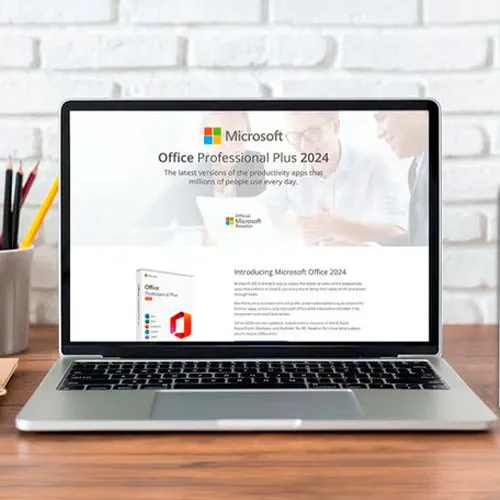
Clé CD Office 2024 Professionnel Plus : la clé pour une productivité optimale

Découvrez le summum de la productivité avec Microsoft Office 2024 Professionnel Plus : la clé d'une efficacité optimale pour toutes vos tâches. Exploitez toute la puissance de cette suite de productivité ultime et plongez dans un monde où la création, la gestion et le partage de documents, de données et de présentations deviennent une expérience fluide et dynamique.

Conçue pour les étudiants, les professionnels et les entrepreneurs, cette suite logicielle de pointe révolutionne votre façon de travailler. Accédez à vos fichiers et modifiez-les facilement depuis n'importe quel appareil, garantissant ainsi un flux de travail fluide et efficace. Avec des applications polyvalentes comme Word, Excel, PowerPoint, Outlook, Access et OneNote à portée de main, vos possibilités sont infinies.

Bénéficiez des dernières fonctionnalités et améliorations d'Office 2024 Professionnel Plus et propulsez votre travail vers de nouveaux sommets de créativité et de précision. Dites adieu aux limitations et entrez dans un avenir où la productivité ne connaîtra plus de limites, grâce à la clé CD mondiale de Microsoft Office 2024 Professionnel Plus.


  • Vais-je recevoir une facture ?
    La facture sera générée automatiquement lors de la passation d'une commande.

  • Où puis-je trouver ma facture ?
    Une fois la commande terminée, la facture sera disponible sous « Mon compte » (coin supérieur droit de la barre supérieure) -> « Historique des commandes ».

  • Puis-je modifier ma facture ?
    Actuellement, vous ne pouvez pas le faire vous-même. Veuillez contacter notre service client par e-mail à l'adresse [email protected] ; nous serons ravis de vous aider. Pour accélérer le processus, veuillez indiquer le numéro de commande et toute information pertinente que vous souhaitez voir apparaître (nom, numéro de carte d'identité/numéro fiscal, etc.).

  • Puis-je l'installer sur macOS ?
    Non, ce produit ne prend pas en charge macOS, uniquement compatible avec Windows 10 et 11.

  • Puis-je échanger ce produit n'importe où ?
    Oui, ce produit est une version mondiale.

  • Puis-je transférer ce produit sur un nouveau matériel ?
    Non, le code est valable pour 1 PC ou 1 installation - si vous désinstallez ou réinstallez, vous devrez peut-être acheter un nouveau code.

  • Existe-t-il une manière spécifique d’installer ce produit ?
    Veuillez lire l'onglet « Activation ».

  • Que faire si j'ai besoin d'un autocollant COA pour ce produit ?
    L'impression de l'étiquette COA peut être numérisée et vous être envoyée sur demande, moyennant des frais supplémentaires.

To install the correct version of Office ProPlus 2024, please check out the instructions in this PDF: https://download.dlr-as.com/instructions/Installation-Office-ProPlus2024.pdf 

1-After installation, open Word (or any Office app)
When the Office Activation Wizard appears, select “Activate by phone.”
The wizard will display your Installation ID (IID) - you will need this shortly.
The IID is shown as 9 groups of 7 digits.

2-Go to the activation website
Open your browser and go to: https://aka.ms/aoh

3-Sign in
Choose Microsoft Account as the login method and sign in with your Microsoft account.

4-Select “Activate a Microsoft Product”
On the first page, click Activate a Microsoft Product.

5-Choose the product type
Select the category that matches what you are activating:

  • Windows → for Windows activation
  • Microsoft Office → for Office, Project, or Visio
  • Windows Server, etc., if applicable

Note: For Project and Visio, choose Microsoft Office.

6-Select your operating system

7-Choose the product version
Select the version you are activating, for example:

  • Office / Project / Visio 2024
  • Office / Project / Visio 2021
  • Office / Project / Visio 2019, etc. 

8-Enter your Installation ID (IID)
You will see nine empty boxes.
Enter each group of digits from your IID into the matching box (9 groups of 7 digits).
When finished, submit the form to continue.

9-Answer the usage question
When asked, “How many computers have you installed this copy on?”
Type 0, then continue.

10-Receive your Confirmation ID
The website will display your Confirmation ID.

11-Enter the Confirmation ID into your PC
Return to the Office activation wizard and enter the Confirmation ID to finish activation.


 **For a more visual guide, watch our tutorial video here:


Mladen Jevtić 27/11/2025

Works perfect, easy install and activation. Just follow the instructions.

Jonathan Lee 19/11/2025

Works perfectly, you just need to follow the exact steps outlined

Andrew Smith 15/11/2025

I contacted support because i mistakenly selected online activation for my product, they fixed the issue within 30mins and my product is now working fine.

Andrew Smith 15/11/2025

I contacted support because i mistakenly selected online activation, and the fixed the issue in less than 30mins... My product is activated and i am 100% satisfied

Vitor Miguel 14/11/2025

Bought the key, was emailed with the payment confirmation and activated my Office in less than 5 minutes, and had no issues whatsoever. Great! Thumbs up!
Comprei a chave, recebi o email com a confirmação do pagamento e ativei meu Office em menos de 5 minutos, e não tive nenhum problema. Maravilha!

Écrire une critique

Remarque: HTML n`est pas traduit!
Captcha
Review Score: 5 / 5
Mladen Jevtić 27/11/2025

Works perfect, easy install and activation. Just follow the instructions.

Jonathan Lee 19/11/2025

Works perfectly, you just need to follow the exact steps outlined

Andrew Smith 15/11/2025

I contacted support because i mistakenly selected online activation for my product, they fixed the issue within 30mins and my product is now working fine.

Andrew Smith 15/11/2025

I contacted support because i mistakenly selected online activation, and the fixed the issue in less than 30mins... My product is activated and i am 100% satisfied

Vitor Miguel 14/11/2025

Bought the key, was emailed with the payment confirmation and activated my Office in less than 5 minutes, and had no issues whatsoever. Great! Thumbs up!
Comprei a chave, recebi o email com a confirmação do pagamento e ativei meu Office em menos de 5 minutos, e não tive nenhum problema. Maravilha!