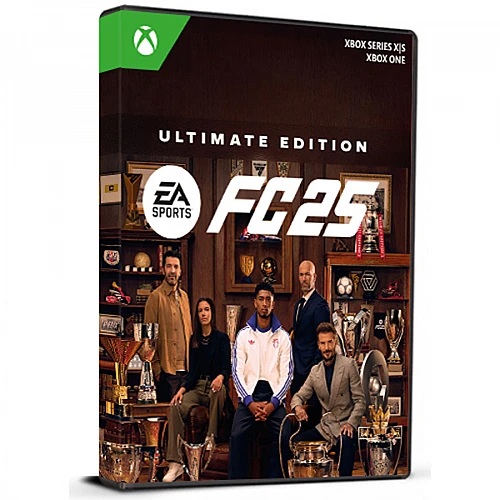

EA Sports FC 25 Ultimate Edition Cd Key Xbox one / Series X/S Global

EA Sports FC 25 Ultimate Edition Cd Key Xbox one / Series X/S Global

評級

評論
價格
  • $15.66
cards klarna GPay Apple Pay affirm afterpay
平台
Xbox Xbox
獲得的積分:
30
可用性
缺貨
支援
24/7 支援
交付
免费数字交付
您的地区
支持

$15.66

EA Sports FC 25 终极版

PC 版 EA Sports FC 25 提供逼真的足球体验,拥有授权球员、球队和联赛。它采用 HyperMotionV 技术,可实现准确的游戏内动作,PlayStyles 可实现独特的球员能力,革命性的 Frostbite Engine 可实现逼真的细节。游戏包括 Ultimate Team Evolutions、俱乐部和 VOLTA FOOTBALL 中的交叉游戏,以及经理和球员生涯模式的选项。玩家可以通过 Windows 上的 EA App 或 Origin Client 激活游戏。

主要特点:
- EA Sports FC 25 是一款高度真实的 PC 足球游戏。
- 包括获得授权的球员、球队和联赛。
- 功能包括 HyperMotionV 技术、PlayStyles 和革命性的 Frostbite Engine。
- 该游戏提供终极球队进化以及俱乐部和 VOLTA FOOTBALL 的跨平台游戏。
- 可以通过 EA App 或 Origin Client 进行激活。

终极功能:
- 3 名 ICON 球员 - 通过特殊 ICON 开启你的球员生涯 - David Beckham、Zinedine Zidane 和 Ronaldo Nazario
- 终极球队球员租借物品
- 大使借出物品
- 俱乐部 PlayStyles 插槽
- 250,000 俱乐部硬币
- 经理生涯中的五星级教练
- 经理生涯中的 5 星青年球探
- 不可交易的 FC 25 英雄球员物品,11 月升级为“Prime”版本
- 自 9 月 20 日起提前 7 天访问
- PlayStation、Xbox 和 PC 上 4,600 FC 积分,Nintendo Switch 上 3,850 FC
- 在抢先体验版中与好友一起玩 Rush 可获得双倍奖励积分
- 终极团队进化槽 - Power Shot Plus 升级
- 不可交易的 FC 24 游戏巨星图标或英雄物品
- FC Hub 第 1 季领先(编辑)


  • 我会收到发票吗?
    下订单后将自动生成发票。

  • 我可以在哪里找到我的发票?
    订单完成后,发票将在“我的帐户”(顶部栏右上角)->“订单历史记录”下显示。

  • 我可以编辑我的发票吗?
    目前,您无法自行执行此操作。请通过电子邮件 [email protected] 联系我们的支持人员,我们将很乐意为您提供帮助。为了加快处理速度,请提供订单号和您希望显示的任何相关信息(例如您的姓名、身份证/税号等)。

  • 这个产品适用于所有平台吗?
    不,该产品仅适用于 Xbox 平台。

  • 我可以在任何地方兑换此产品吗?
    是的,此产品是全球版本。

  • 该产品是游戏、积分、订阅还是 DLC?
    本产品是基础游戏的终极版

  • 我可以将这个游戏转移到新硬件或新控制台上吗?
    是的,此密钥已绑定到您的 Xbox 帐户。

  • 我需要以特定方式安装该产品吗?
    请阅读“激活”标签。

How to activate the key for EA Sports FC 25: Ultimate Edition

Xbox One Console:
1-Sign in to your Xbox Live account and navigate to the "Home" screen.
2-Go to the "Store" in the "Categories" section.
3-Choose "Games" and then select "Use a code."
4-Opt to "enter the 25 character code" and input the code.


Xbox Series X And Series S
1-Sign in to your Xbox One (make sure you’re signed in with the Microsoft account you want to redeem the code with).
2-Select the Microsoft Store app from your Home Screen or search for it.
3-Scroll down to "Redeem Code" (on the left-hand side (under your account name).)
4-Enter the 25-character code that’s displayed on the ‘Order’ page of gamers-outlet.net, then follow the prompts. Don’t worry about hyphens, the system takes care of those for you.
*Note If you can’t locate Store, scroll down to Add more on the Home screen and select the Store tile. (You may need to select See all suggestions.) Then select Add to Home.


Web Browser:
1-Visit https://live.xbox.com/redeemtoken in a web browser.
2-Log in with your Microsoft account details.
3-Enter the code and click "Next"; follow the instructions to complete the redemption process.

該產品沒有評論。

寫評論

注意: HTML 未翻譯!
Captcha